
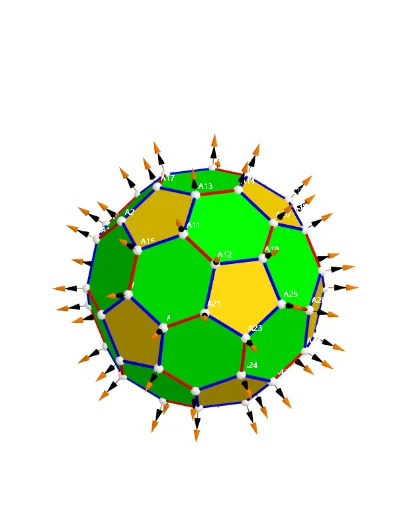
Inscribed Truncated Icosahedron (Extreme Distribution) with 60 Vertices
Loading the math board and drawing, please wait…
This example demonstrates a 3D construction of a truncated icosahedron configured as an inscribed/ball-contact solid on a sphere, producing a vertex set of 60 and revealing an “extreme distribution” style geometric arrangement over spherical space. The key mathematical ideas are solid geometry (truncated icosahedron), spherical geometry (Sphere), and the use of discrete vertices and edges to represent polyhedral structure in vector/parameter form. Construction highlights: Sphere is used to create the reference sphere; Sequence and TableText organize vertex indexing and labels; Sum together with Zip aggregates and maps parameters/data tables to generate vertex data; Points00 and Segments are used to create the vertex set and the connecting edges (with auxiliary objects such as lVector1/lVector2/lVector3, bueseg, and Cm supporting vector assembly and edge integration, while Text/UnicodeToLetter handle annotations). Suitable for high school to undergraduate learners for geometry visualization, CAD-style geometric construction, and discussions on spherical point/vertex distributions.
GeoGebra Commands & Parameters
UnicodeToLetter(34) → u34Text("" + Um1) → txt_pSum(Flatten[Sequence[Append[Sequence[Element[txt_p, i], i, m01(k), m02(k)], " "], k, 1, 5]]) → txtUm1Zip(Vector[a, a + UnitVector[a]], a, Points00) → lVector1Zip(Vector[a, a + (1.5 * UnitVector[b])], a, Points00, b, Wi_Pc) → lVector2Zip(Vector[a, a + (1.5 * UnitVector[b])], a, Points00, b, Wi_P) → lVector3Sphere((0, 0, 0), 5) → sphTableText(Append["i", 1…n], Append[" \fgcolor{orange}{GM :Δφ_i}, rad", l1w], Append["\fgcolor{magenta}{GC :Δφ_i} , rad", l1cw], "v") → text23rZip(Segment[Element[Points00, y(a)], Element[Points00, z(a)]], a, ll1bb(1)) → ll1Zip(Segment[Element[Points00, y(a)], Element[Points00, z(a)]], a, ll1bb(2)) → ll2Zip(Segment[Element[Points00, y(a)], Element[Points00, z(a)]], a, ll1bb(3)) → ll3Zip(Segment[Element[Points00, y(a)], Element[Points00, z(a)]], a, ll1bb(4)) → ll4Zip(Segment[Element[Points00, y(a)], Element[Points00, z(a)]], a, ll1bb(5)) → ll5Zip(Segment[Element[Points00, y(a)], Element[Points00, z(a)]], a, ll1bb(6)) → ll6Zip(Segment[Element[Points00, y(a)], Element[Points00, z(a)]], a, ll1bb(7)) → ll7Zip(Segment[Element[Points00, y(a)], Element[Points00, z(a)]], a, ll1bb(8)) → ll8Zip(Segment[Element[Points00, y(a)], Element[Points00, z(a)]], a, ll1bb(9)) → ll9Zip(Segment[Element[Points00, y(a)], Element[Points00, z(a)]], a, ll1bb(10)) → ll10Sequence(Polygon[Sequence[Points3D(m5(f, k)), k, 1, Length[m5(1)]]], f, 1, Length[m5]) → poly001Sequence(Polygon[Sequence[Points3D(m6(f, k)), k, 1, Length[m6(1)]]], f, 1, Length[m6]) → poly002
AI Drawing Prompt Reference
Create a 3D scene with a sphere centered at the origin (radius 5) as the reference. On the sphere, construct a discrete set of 60 vertices representing a truncated icosahedron arranged as an inscribed/ball-contact solid. Plot the vertices as points and connect them with segments to form the polyhedral edges and faces; generate two polygon face sets to reflect the different groups of faces. Add vertex index and colored annotation text that labels each vertex with its corresponding Δφ radial angle information, laid out as a readable sequence. The final figure should show the truncated icosahedron’s extreme distribution style over spherical space.
The prompt above was compiled from the original drawing commands and is for reference only.