
Inscribed Rectangle in a Triangle: Quadratic Function Model
Loading the math board and drawing, please wait…
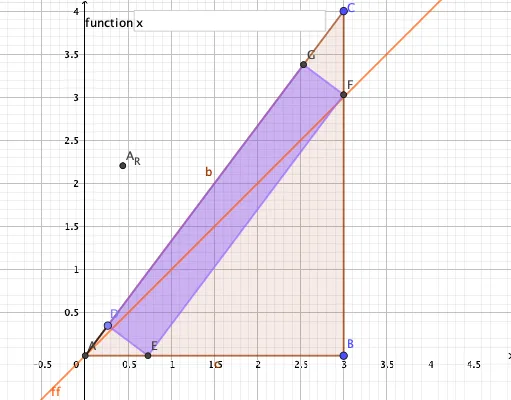
①This example demonstrates how to construct a rectangle inscribed in an arbitrary triangle and observe how its area changes as the rectangle's position varies, revealing a quadratic relationship between area and position. ②Core math concepts include quadratic functions, optimization (maximizing area), geometric constraints (rectangle vertices lying on triangle sides), and function modeling. ③Construction details: using GeoGebra commands such as Intersect to find points, Polygon to create the triangle, Point for dynamic vertices, OrthogonalLine to ensure perpendicularity, Segment for edges, Extremum to locate the maximum of the area function, and Textfield/InputBox1 for interactive input, ultimately producing a graph of the area as a quadratic function of the rectangle's position. ④Suitable for high school students learning quadratic functions, connecting geometry with algebra, or for mathematical modeling activities to illustrate how geometric problems translate into function optimization.
GeoGebra Commands & Parameters
Intersect(xAxis, yAxis) → APolygon(A, B, C) → t1, c, a, bPoint(b) → DOrthogonalLine(D, b) → fIntersect(f, c) → EOrthogonalLine(E, f) → gIntersect(g, a) → FOrthogonalLine(F, g) → hIntersect(h, b) → GPolygon(D, E, F, G) → q1, d, e, f_1, g_1Segment(A, D) → iExtremum(ff) → HTextfield(ff) → InputBox1
AI Drawing Prompt Reference
Draw an arbitrary triangle with its base on the horizontal axis and one vertex on the vertical axis. Pick a moving point on one side of the triangle, then construct a rectangle inscribed in the triangle by drawing perpendicular lines from this point to the opposite side, and continuing to create perpendiculars that intersect the other sides, so that the rectangle's four vertices lie on the triangle's sides. Connect the moving point on the base to one triangle vertex with a segment to indicate the rectangle's position. Also show a coordinate system and a text input box for displaying or entering values related to the rectangle's area. The figure illustrates how the rectangle's area varies as a quadratic function of its position, and marks the point where the area reaches its maximum.
The prompt above was compiled from the original drawing commands and is for reference only.