
Inscribed Equilateral Triangle Exercise
Loading the math board and drawing, please wait…
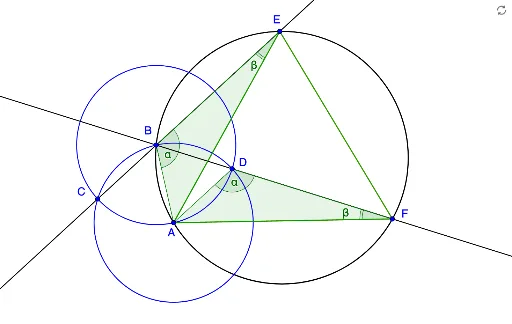
This example demonstrates how to construct an equilateral triangle inscribed in a circle. It involves core mathematical concepts such as circles, triangles, angles, and geometric constructions. The construction uses GeoGebra commands/objects: Circle, Intersect, Line, Segment, Polygon, Angle. Suitable for high school students learning and practicing geometric constructions.
GeoGebra Commands & Parameters
Circle(A_1, A) → cCircle(A, C_1) → dIntersect(c, d, 2) → BCircle(B, A) → eIntersect(d, e, 1) → CIntersect(d, e, 2) → DLine(C, B) → aIntersect(c, a, 2) → ELine(B, D) → bIntersect(c, b, 2) → FSegment(E, F) → fSegment(F, A) → gSegment(E, A) → hSegment(B, A) → iSegment(D, A) → jPolygon(E, B, A) → poly1, a_1, e_1, b_1Polygon(F, D, A) → poly2, a_2, f_1, d_1Angle(A, B, E) → αAngle(A, D, F) → βAngle(D, F, A) → γAngle(B, E, A) → δ
AI Drawing Prompt Reference
Draw an equilateral triangle inscribed in a circle. Start by drawing a circle, then find two points on the circle to determine the other two vertices of the equilateral triangle. Finally, connect these points to form the triangle.
The prompt above was compiled from the original drawing commands and is for reference only.