
Inscribed-circle construction via circles, polygons, and mirror transforms
Loading the math board and drawing, please wait…
In collections
Poorly Drawn Parallelograms 3
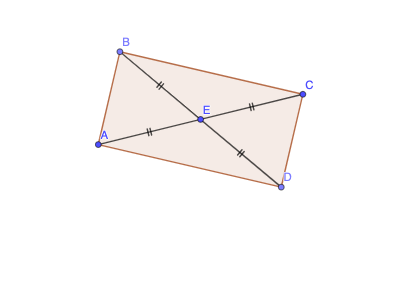
This GeoGebra example visually demonstrates a geometric construction where circles and mirror transformations are used to explore relationships connected to an inscribed (incircle) configuration. The core ideas include fundamental circle geometry, the inscribed-circle concept relative to a polygon/triangle boundary, and the invariance properties of mirror (reflection) transformations (preserving distances and angle measures). The construction highlights how a combination of basic primitives and transforms can generate key configuration points and derived objects. From the construction summary, the main GeoGebra commands are Circle (construct circles), Mirror (reflect objects), Point (create points), Polygon (form the polygonal/triangular framework), and Segment (draw connecting sides). The used objects include points and circle-related entities such as E, A, c, C, B, D, q1, b, c_1, b', c', and additional elements f, g, h, i that support the final visualization. Suitable for middle-school to early high-school geometry, GeoGebra-based construction lessons, and contest geometry practice focused on incircle-related reasoning and transformation-based visualization.
GeoGebra Commands & Parameters
Circle(E, A) → cMirror(A, E) → CPoint(c) → BMirror(B, E) → DPolygon(A, B, C, D) → q1, b, c_1, b', c'Segment(A, E) → fSegment(E, B) → gSegment(E, C) → hSegment(E, D) → i
AI Drawing Prompt Reference
Draw a triangle ABC formed by points A and E, then reflect A to get C and reflect B to get D. Construct a quadrilateral q1 from these points and draw line segments f, g, h, i from E to each point. This figure illustrates the use of circles and mirror transformations in geometric construction, highlighting symmetric relationships and visual effects of line connections.
The prompt above was compiled from the original drawing commands and is for reference only.