
Inch and Centimeter Ruler
Loading the math board and drawing, please wait…
In collections
Virtual Manipulatives
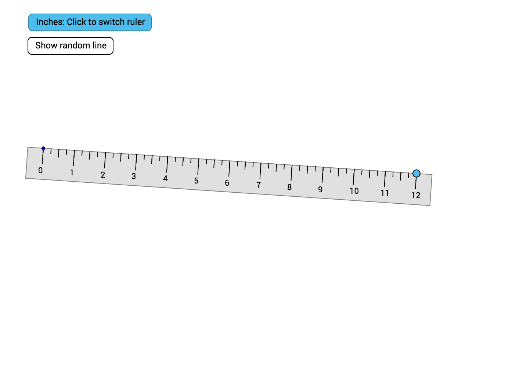
This example demonstrates how to draw a ruler with inch and centimeter markings. It involves core mathematical concepts such as unit vectors, orthogonal vectors, polygons, and sequences. Construction highlights the use of GeoGebra commands like Circle, Point, UnitVector, OrthogonalVector, Polygon, Sequence, etc. Suitable for middle school and above students to learn about length unit conversion and geometric constructions.
GeoGebra Commands & Parameters
Circle(A, a) → cPoint(c) → BUnitVector(Segment[A, B]) → uOrthogonalVector(u) → vPolygon(A + (-0.5 * u), A, B, B + (0.5 * u), B + (0.5 * u) + (-v), A + (-0.5 * u) - v) → poly1, f, a_1, b, g, h, iSequence(Segment[A + (i * u), A + (i * u) - (0.5 * v)], i, 0, a) → tickInchSequence(Segment[A + ((i * 0.5) * u), A + ((i * 0.5) * u) - (0.25 * v)], i, 0, (2 * a)) → tickInchHalfSequence(Segment[A + ((i * 0.25) * u), A + ((i * 0.25) * u) - (0.15 * v)], i, 0, (4 * a)) → tickInchQuarterAngle(u, Vector[(1, 0)]) → αSequence(Text[i, A + (i * u) - (0.8 * v) - (0.1, 0)], i, 0, a) → labelsInchSegment((Random[2, 4], Random[6, 10]), (Random[8, 12], Random[2, 10])) → jSequence(Text[i, A + ((i * u) * cm) - (0.8 * v) - (0.1, 0)], i, 0, (a * 2.54)) → lablesCMSequence(Segment[A + (((i * u) * cm) * 0.5), A + (((i * u) * cm) * 0.5) - (0.25 * v)], i, 0, ((a * 2.54) * 2)) → tickCMHalfSequence(Segment[A + ((i * u) * cm), A + ((i * u) * cm) - (0.5 * v)], i, 0, (a * 2.54) + 1) → tickCM
AI Drawing Prompt Reference
Draw a ruler with both inch and centimeter markings. Start with a circle and a point on it; from the center to that point define a unit direction and its perpendicular. Use these to form a rectangular ruler body. Along the ruler, place long tick marks at each whole inch, medium ticks at half inches, and short ticks at quarter inches, with numbers near the whole-inch ticks. Then repeat similar ticks and numbers using centimeter spacing (1 inch = 2.54 cm). Finally, add a random segment as a reference.
The prompt above was compiled from the original drawing commands and is for reference only.