
IM Geo.1.2 Lesson: Constructing Patterns
Loading the math board and drawing, please wait…
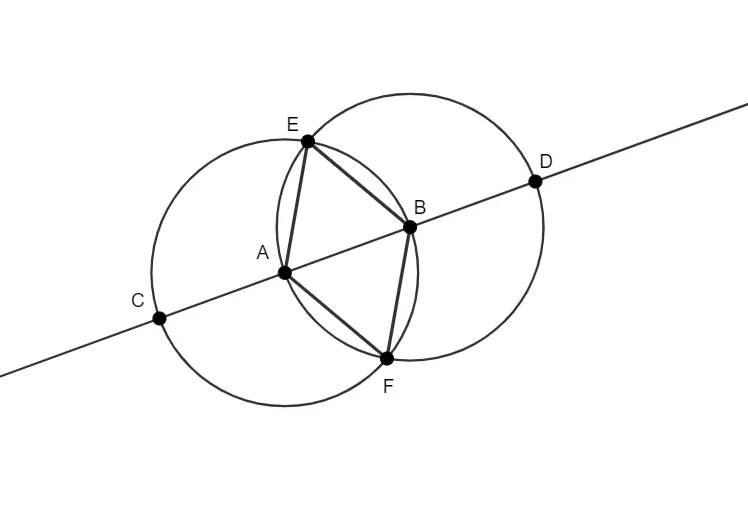
This example demonstrates how to construct patterns in three-dimensional space using GeoGebra. Core mathematical concepts include sphere, 3D vectors, differential equations, and derivatives. Construction highlights involve using GeoGebra commands like Circle, Line, Intersect, and Segment, with objects such as B, A, c, f, pic1, C, d, E, F, D, g, h, i, j. Suitable for high school and above students learning spatial geometry and vector analysis.
GeoGebra Commands & Parameters
Circle(A, B) → cLine(A, B) → fIntersect(c, f, 1) → CCircle(B, Segment[A, C]) → dIntersect(c, d) → E, F, ,Intersect(d, f, 2) → DSegment(A, E) → gSegment(E, B) → hSegment(B, F) → iSegment(F, A) → j
AI Drawing Prompt Reference
Construct a 3D geometric pattern starting from two given points. Draw a line through the points, then create a circle using one of these points, and compute the intersection of the line with that circle to get an intermediate point. Next, form another circle centered at the other point that passes through the first intersection point, then keep taking intersections between the new circle and the previously used circle/line (with specified intersection choices) to obtain several additional intersection points. Finally, draw line segments connecting the start point to each relevant intersection point, as well as segments linking between the intersection points, assembling a closed or partially closed polygon-like configuration that reflects a spatial, vector-oriented layout.
The prompt above was compiled from the original drawing commands and is for reference only.