
Illusion of Rotation: Equilateral Triangles Circling Around a Circle
Loading the math board and drawing, please wait…
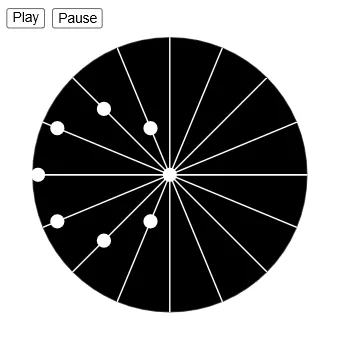
This example demonstrates an optical illusion where multiple equilateral triangles moving uniformly around a circle create the visual effect of continuous rotation. Core mathematical concepts include: geometric construction of equilateral triangles, rotation matrix transformations, parametric equations and sequence generation, and visual persistence effects. Construction key points: Use the Sequence command to generate multiple equilateral triangle objects, draw a reference circle with the Circle command, use matrix rotation transformations to control the position and angle changes of triangles, and implement dynamic demonstration with slider animations (button1, button2, speed). Suitable for teaching in middle school geometry modules and can be used in university linear algebra courses for intuitive demonstration of matrix transformations.
GeoGebra Commands & Parameters
Sequence(((r * cos((j * π / 8))), (r * sin((j * π / 8)))), j, 0, 7) → l1Sequence((0, 0) + ((r * cos(t - (j * π / 8))) * UnitVector[Vector[l1(j + 1), (0, 0)]]), j, 0, 7) → l2Sequence(((r * cos((j * π / 8))), (r * sin((j * π / 8)))), j, 9, 16) → l3Sequence(Circle[l2(j), rSmall], j, 1, Length[l2]) → l5Circle((0, 0), r + rSmall) → cSequence(Segment[(((r + rSmall) * cos((j * π / 8))), ((r + rSmall) * sin((j * π / 8)))), (((r + rSmall) * cos((j * π / 8) + π)), ((r + rSmall) * sin((j * π / 8) + π)))], j, 0, 8) → l4
AI Drawing Prompt Reference
Draw a graphic of multiple equilateral triangles rotating around a circle. The triangles are evenly distributed around the circle, and their positions and orientations change as they rotate. The circle serves as the background, and the triangles' movement can be observed by adjusting the rotation speed.
The prompt above was compiled from the original drawing commands and is for reference only.