
Fibonacci Spiral: Geometric Beauty of the Golden Ratio
Loading the math board and drawing, please wait…
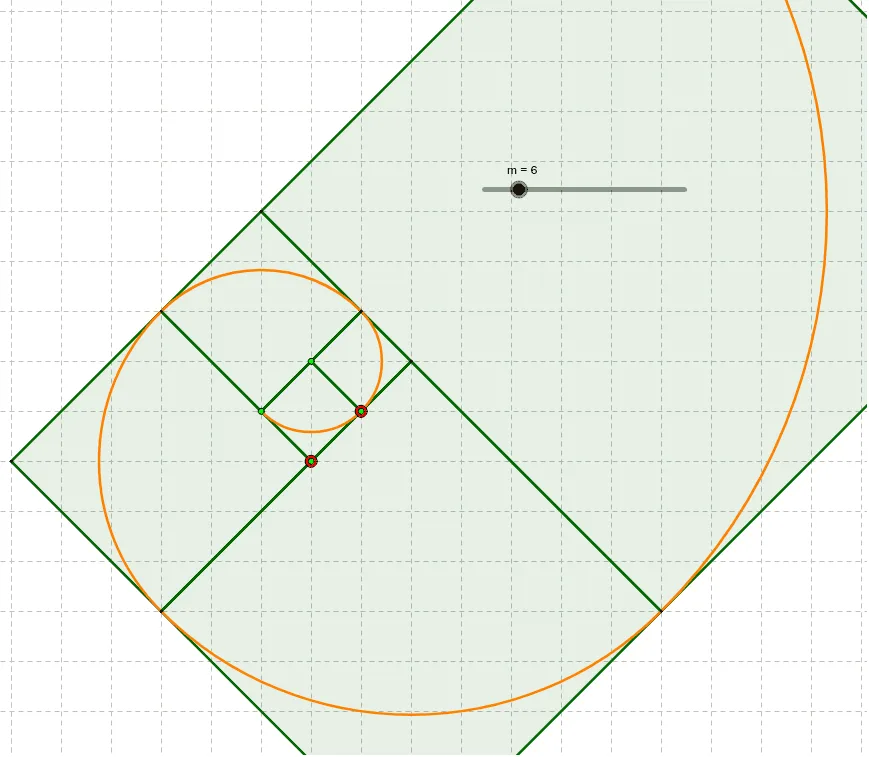
① This example dynamically constructs the classic Fibonacci spiral through a series of rotated squares and quarter-circle arcs, visually revealing the golden ratio in geometry. ② Core mathematical concepts include the Fibonacci sequence, golden ratio, relationship between square side lengths and arcs, and iterative thinking in sequences and transformations. ③ Construction highlights: using GeoGebra commands Rotate to rotate squares, Sequence to generate successive squares, and CircleArc to draw quarter-circle arcs connecting square vertices; objects include points A, B, A1–A10, B1–B10 and many arcs, building each segment of the spiral iteratively. ④ Suitable for upper secondary to early university students, for exploring connections between sequences and geometry, as a teaching example in mathematical art or programming visualization, and for understanding recursive construction and limit concepts.
GeoGebra Commands & Parameters
Rotate(B1, 1.5707963267948966, A1) → D1Rotate(B2, 1.5707963267948966, A2) → D2Rotate(B3, 1.5707963267948966, A3) → D3Rotate(B4, 1.5707963267948966, A4) → D4Rotate(B5, 1.5707963267948966, A5) → D5Rotate(B6, 1.5707963267948966, A6) → D6Rotate(B7, 1.5707963267948966, A7) → D7Rotate(B8, 1.5707963267948966, A8) → D8Rotate(B9, 1.5707963267948966, A9) → D9Rotate(B10, 1.5707963267948966, A10) → D10Rotate(B11, 1.5707963267948966, A11) → D11Rotate(B12, 1.5707963267948966, A12) → D12Rotate(B13, 1.5707963267948966, A13) → D13Rotate(B14, 1.5707963267948966, A14) → D14Rotate(B15, 1.5707963267948966, A15) → D15Rotate(B16, 1.5707963267948966, A16) → D16Rotate(B17, 1.5707963267948966, A17) → D17Rotate(B18, 1.5707963267948966, A18) → D18Rotate(B19, 1.5707963267948966, A19) → D19Rotate(B20, 1.5707963267948966, A20) → D20Rotate(B21, 1.5707963267949, A21) → D21Rotate(B22, 1.5707963267949, A22) → D22Rotate(B23, 1.5707963267949, A23) → D23Rotate(B24, 1.5707963267949, A24) → D24Rotate(B25, 1.5707963267949, A25) → D25Rotate(B26, 1.5707963267949, A26) → D26Rotate(B27, 1.5707963267949, A27) → D27Rotate(B28, 1.5707963267949, A28) → D28Rotate(B29, 1.5707963267949, A29) → D29Rotate(B30, 1.5707963267949, A30) → D30Sequence(Polygon[Element[A1:A30, k], Element[B1:B30, k], 4], k, 1, m) → l1Sequence(CircleArc[Element[A1:A30, k], Element[B1:B30, k], Element[D1:D30, k]], k, 2, m) → list1CircleArc(C1, D1, B1) → c
AI Drawing Prompt Reference
Draw a Fibonacci spiral composed of a sequence of squares with side lengths following the Fibonacci sequence, each rotated 90 degrees and placed adjacent to the previous one. Starting from the initial square, draw quarter-circle arcs connecting the outer vertices of consecutive squares, forming a continuous smooth spiral curve. Generate all squares and arcs iteratively in order, revealing the geometric beauty of the golden ratio.
The prompt above was compiled from the original drawing commands and is for reference only.