
Identifying Trig Ratios: Quick Formative Assessment
Loading the math board and drawing, please wait…
In collections
Geometry Review
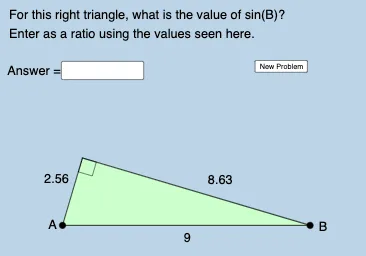
This example demonstrates how to quickly generate trigonometric ratio assessment questions using GeoGebra. The key mathematical concepts involved include trigonometry, geometric construction, and right triangles. Construction involves using commands like Random, Segment, Semicircle, Rotate, and objects such as points A, B, C. It is suitable for middle or high school mathematics classrooms to facilitate quick assessment creation and practice.
GeoGebra Commands & Parameters
Random(5, 10) → dSegment(B, A) → hSemicircle(A, B) → cRotate(B, (Random[30, 150] * π / 180), Midpoint[A, B]) → B'_2Segment(A, B'_2) → fRandom(30, 150) → aSegment(B'_2, B) → gRandom(1, 6) → nElement(L_1, n) → text1Textfield(b) → InputBox1Polygon(A, B'_2, B) → t1, b_1, a_1, b'_2Angle(A, B'_2, B) → αAngle(B'_2, B, A) → βAngle(B, A, B'_2) → γ