
Identifying Slope and y-intercept (1)
Loading the math board and drawing, please wait…
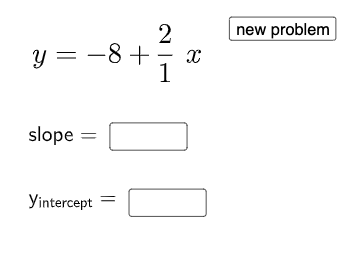
This interactive GeoGebra example helps students practice identifying the slope and y-intercept of a linear function. The core mathematical concept is the standard form of a linear equation y = mx + b, where m is the slope and b is the y-intercept. The construction uses GeoGebra commands such as Random and RandomElement to generate random linear expressions, and If along with text objects (text1, text2) to display the problem and hints. Users enter their answers for slope and y-intercept into InputBox1 and InputBox2, and a button (button1) triggers the evaluation with feedback. This activity is suitable for middle school algebra classes, serving as an interactive drill or self-assessment tool to reinforce understanding of slope and intercept in linear functions.
GeoGebra Commands & Parameters
Random(1, 2) → nRandomElement(Sequence[i, i, 1, 9, 1]) → dRandom(-9, 9) → bIf(n ≟ 1, f, g) → hTextfield(a) → InputBox1Textfield(c) → InputBox2
AI Drawing Prompt Reference
Draw a graph of a randomly generated linear function in the form y = mx + b, where m and b are random integers, with input boxes next to the graph for users to enter the values of m and b, and a button to check if their answers are correct while providing feedback.
The prompt above was compiled from the original drawing commands and is for reference only.