
Identify Squares and Rectangles
Loading the math board and drawing, please wait…
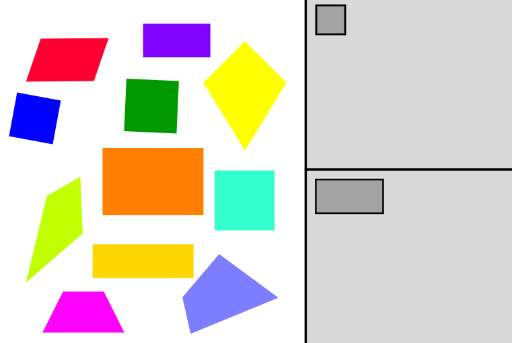
This example demonstrates how to identify and classify squares and rectangles, and drag them into their respective grey boxes. It involves core mathematical concepts like polygon properties, geometric transformations, and analytical geometry. Construction highlights include commands/objects such as Polygon, Point, Rotate, Centroid, Ray, PointIn, Segment, Mirror, Line, Intersect, OrthogonalLine, and Circle. Suitable for middle school and above students for geometry recognition and classification practice.
GeoGebra Commands & Parameters
Polygon(A, B, 4) → poly1, f, g, h, i, C, DPolygon(E, F, 4) → poly2, j, k, l, m, G, HPolygon(I, J, 4) → poly3, n, p, q, r, K, LPolygon(M, N, 4) → poly4, s, t, c, d, O, PPoint(xAxis) → QPoint(Circle[M_1, Segment[A_1, B_1]]) → N_1Rotate(N_1 + (Segment[B_1, C_1], 0), Angle[C_1 - B_1] + Angle[N_1 - M_1] - Angle[B_1 - A_1], N_1) → O_1Rotate(O_1 + (Segment[C_1, D_1], 0), Angle[D_1 - C_1] + Angle[O_1 - N_1] - Angle[C_1 - B_1], O_1) → P_1Polygon(M_1, N_1, O_1, P_1) → poly10, m_1, n_1, o_1, p_1Point(Circle[Q_1, Segment[U, V]]) → R_1Rotate(R_1 + (Segment[V, W], 0), Angle[W - V] + Angle[R_1 - Q_1] - Angle[V - U], R_1) → S_1Rotate(S_1 + (Segment[W, Z], 0), Angle[Z - W] + Angle[S_1 - R_1] - Angle[W - V], S_1) → T_1Polygon(Q_1, R_1, S_1, T_1) → poly11, q_2, r_2, s_2, t_2Point(Circle[U_1, Segment[Q, R]]) → V_1Rotate(V_1 + (Segment[R, S], 0), Angle[S - R] + Angle[V_1 - U_1] - Angle[R - Q], V_1) → W_1Rotate(W_1 + (Segment[S, T], 0), Angle[T - S] + Angle[W_1 - V_1] - Angle[S - R], W_1) → Z_1Polygon(U_1, V_1, W_1, Z_1) → poly12, u_1, v_1, w_1, z_2Point(Circle[E_1, 1]) → F_1Polygon(E_1, F_1, G_1, H_1) → poly5, e_1, f_1, g_1, h_1Centroid(poly1) → I_1Centroid(poly2) → J_1Centroid(poly3) → K_1Centroid(poly10) → L_1Centroid(poly11) → A_2Centroid(poly12) → B_2Point(Circle[Q_2, 1.4821605850919128]) → R_2Point(Circle[U_2, 1.4598630072715726]) → V_2Point(Circle[A_3, 1.1415778554264275]) → B_3Point(Circle[E_3, 0.6596969000988258]) → F_3Point(Circle[I_3, 1]) → J_3Ray((0, 0), (1, 0)) → i_1Point(e) → M_3Point(e) → N_3Polygon(M_3, N_3, O_3, P_3) → poly14, m_3, n_3, o_3, p_3PointIn(poly14) → Q_3Point(Circle[Q_3, 1]) → R_3Segment(Q_3, R_3) → j_1Mirror(R_3, Q_3) → S_3Point(Circle[R_3, 2]) → T_3Segment(R_3, T_3) → k_1Line(T_3, S_3) → l_1Line(R_3, l_1) → a_1Line(S_3, k_1) → b_1Intersect(a_1, b_1) → U_3Polygon(T_3, R_3, U_3, S_3) → poly15, t_3, r_3, u_3, s_3PointIn(poly14) → V_3Point(Circle[V_3, 2]) → W_3Segment(V_3, W_3) → q_1Line(W_3, V_3) → r_1Point(r_1) → Z_3OrthogonalLine(V_3, q_1) → s_1Circle(V_3, Z_3) → c_1Intersect(c_1, s_1) → A_4, B_4Polygon(W_3, B_4, Z_3, A_4) → poly6, w_3, b_4, z_3, a_4PointIn(poly14) → C_4Point(Circle[C_4, 0.6]) → D_4Segment(C_4, D_4) → t_1OrthogonalLine(D_4, t_1) → d_1Mirror(D_4, C_4) → E_4Line(E_4, d_1) → f_2Circle(D_4, E_4) → c_2Intersect(c_2, d_1) → F_4, G_4Circle(E_4, C_4) → d_2Intersect(d_2, f_2) → H_4, I_4Polygon(F_4, G_4, I_4, H_4) → poly9, f_4, g_4, i_4, h_4PointIn(poly14) → J_4Point(Circle[J_4, 2]) → K_4Segment(J_4, K_4) → g_2Point(Circle[J_4, 1]) → L_4Segment(J_4, L_4) → h_2Point(Circle[J_4, 1.5]) → M_4Segment(J_4, M_4) → i_2Point(Circle[J_4, 0.9]) → N_4Segment(J_4, N_4) → j_2Polygon(M_4, K_4, L_4, N_4) → poly8, m_4, k_4, l_4, n_4PointIn(poly14) → O_4Point(Circle[O_4, 2]) → P_4Segment(O_4, P_4) → k_2Point(Circle[O_4, 1.5]) → Q_4Segment(O_4, Q_4) → l_2Point(Circle[O_4, 1]) → R_4Segment(O_4, R_4) → m_2Point(Circle[O_4, 0.7]) → S_4Segment(O_4, S_4) → n_2Polygon(P_4, R_4, Q_4, S_4) → poly13, p_4, r_4, q_4, s_4
AI Drawing Prompt Reference
Draw a geometry practice figure with multiple squares and rectangles. Start by creating four squares of different sizes at various positions. Then construct three parallelograms using rotation based on a side and angle. Add a circle with a center and radius, and place a square on it. Mark centroids for each polygon. Finally, pick a random point inside one square, draw a circle around it, and use reflection and rotation to form a rhombus; also pick a point in another square and draw a circle. The layout is for identifying and classifying squares and rectangles.
The prompt above was compiled from the original drawing commands and is for reference only.