
Build the Net of a Prism by Dragging Faces
Loading the math board and drawing, please wait…
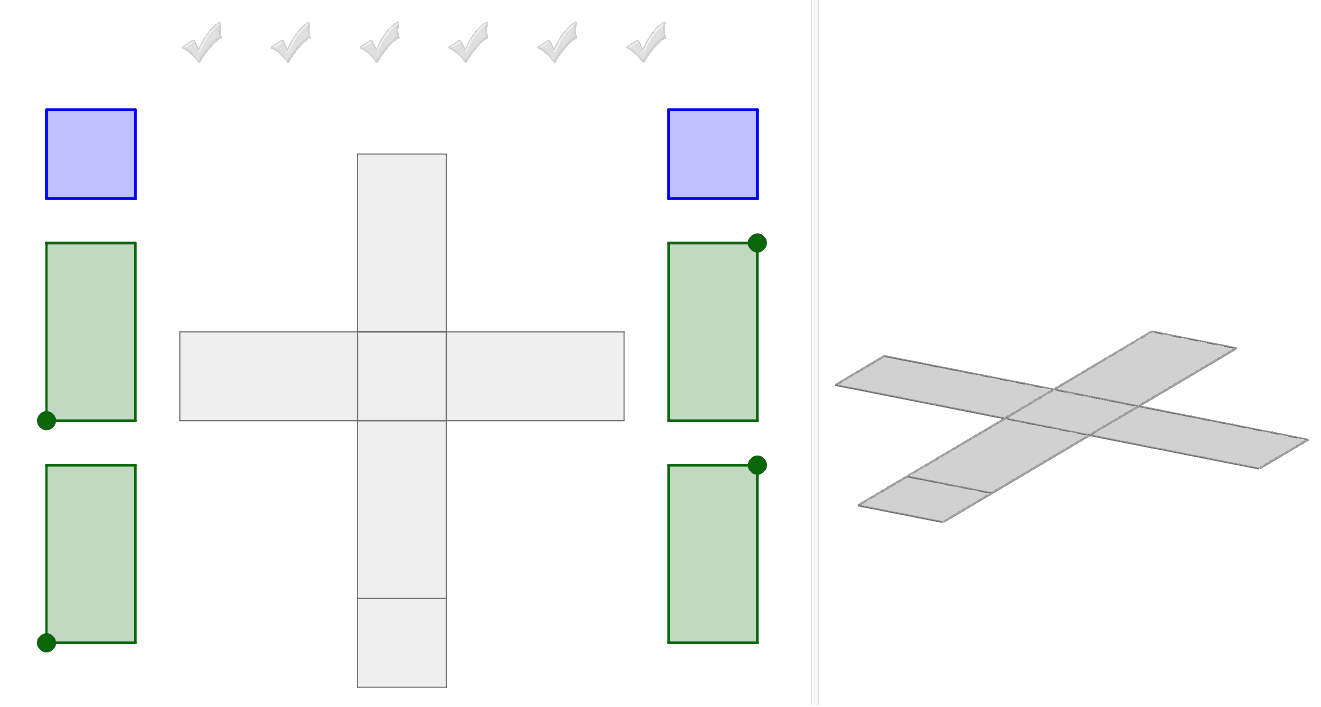
This interactive GeoGebra example demonstrates how to construct the net of a prism (specifically a cuboid) by dragging the blue and green faces onto the grey net template. The core mathematical concepts involve solid geometry, surface nets, and the relationship between 3D shapes and their 2D unfoldings, including faces, edges, and vertices. The construction uses GeoGebra commands such as Prism to create the solid, Net to generate the unfolding, Polygon to define each face, Intersect and Point to locate key vertices, Vector for translations, and AreEqual to check face congruence. Visual feedback is provided through checkmarkGrey objects. This resource is suitable for middle and high school students learning about spatial visualization, surface area, and geometric properties of prisms, and can be used in classroom demonstrations or self-study activities.
GeoGebra Commands & Parameters
Intersect(zAxis, xAxis) → APoint(xAxis) → BPolygon(A, B, 4, xOyPlane) → poly1, f, g, h, i, C, DPrism(poly1, 2) → a, E, edgeAE, edgeBF, edgeCG, edgeDH, edgeEF, edgeFG, edgeGH, edgeEH, F, G, H, faceABFE, faceBCGF, faceCDHG, faceADHE, faceEFGHPoint(Circle[B, Distance[A, B], Segment[A, B]]) → INet(a, c) → d, V_1, G_2, H_2, I_2, J_2, K_2, face1, face2, face4, face5, face3, W_1, face6, edge1, edge5, edge8, edge2, edge3, edge13, edge6, edge7, edge16, Z_1, edge9, edge10, edge17, edge11, edge12, edge18, edge4, edge15, edge19, edge14, A_2, B_2, C_2, D_2, E_2, F_2Net(a, o) → p, H_3, Q_3, R_3, S_3, T_3, U_3, face13, face14, face16, face17, face15, I_3, face18, edge39, edge43, edge46, edge40, edge41, edge51, edge44, edge45, edge54, J_3, edge47, edge48, edge55, edge49, edge50, edge56, edge42, edge53, edge57, edge52, K_3, L_3, M_3, N_3, O_3, P_3Polygon(Z_2, A_3, 4) → poly7, m_1, n_1, p_1, q_1, B_3, C_3Polygon(V_3, W_3, 4) → poly8, r_1, s_1, t_1, a_1, Z_3, A_4Point(Circle[B_4, 2]) → C_4Polygon(B_4, C_4, D_4, E_4) → poly9, b_4, c_4, d_4, e_4Point(Circle[F_4, 2]) → G_4Polygon(F_4, G_4, H_4, I_4) → poly10, f_4, g_4, h_4, i_4Point(Circle[J_4, 2]) → K_4Polygon(J_4, K_4, T_4, U_4) → poly11, j_4, k_4, t_4, u_4Point(Circle[V_4, 2]) → W_4Polygon(V_4, W_4, Z_4, A_5) → poly12, v_4, w_4, z_4, a_5Polygon(J, K, L, M) → poly2, j, k, l, mPolygon(M, N, C_1, N_2) → poly3, m_2, n, c_1, n_2Polygon(L, O_2, P_2, Q_2) → poly4, l_1, o_2, p_2, q_2Polygon(N, O_2, R_2, S_2) → poly5, n_3, o_1, r_2, s_2Polygon(L, O_2, N, M) → poly6, l_2, o_3, n_4, m_3Polygon(T_2, U_2, P_2, Q_2) → poly13, t_2, u_2, p_3, q_3AreEqual(poly7, poly8) → CheckSquaresVector(B_5, C_5) → u
AI Drawing Prompt Reference
Draw a rectangular prism and its net. Start with a cuboid having a square base. Unfold all six faces into a flat net, including four side faces and two bases. Use distinct colors for draggable faces and a grey template as the target. Add several separate quadrilaterals and circles with points to check face congruence, plus a vector showing drag direction. Illustrate the relationship between the 3D solid and its 2D unfolding.
The prompt above was compiled from the original drawing commands and is for reference only.