
Hypotenuse-Leg (HL) Quick Exploration
Loading the math board and drawing, please wait…
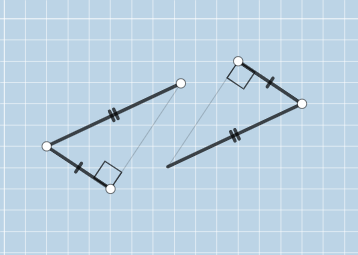
This example demonstrates how to determine triangle congruence using the hypotenuse and one leg of a right triangle, and explores geometric construction techniques. Key mathematical concepts include triangle congruence, geometric construction, and properties of right triangles. The construction involves GeoGebra commands such as Segment, OrthogonalLine, Point, Circle, etc. Suitable for middle school or high school students learning geometry, or for math teaching demonstrations.
GeoGebra Commands & Parameters
Segment(A, B) → fOrthogonalLine(B, f) → gPoint(g) → HPoint(Ray[B, H]) → CSegment(C, A) → hSegment(C, B) → iPoint(Circle[D, f]) → ESegment(D, E) → jOrthogonalLine(E, j) → kCircle(D, h) → cIntersect(c, k, 2) → FSegment(D, F) → lSegment(E, F) → mIntersect(c, k, 1) → GSegment(D, G) → nAngle(C, B, A) → αAngle(F, E, D) → βAngle(D, E, G) → γSegment(E, G) → pPolygon(A, B, C) → t1, c_1, a, b
AI Drawing Prompt Reference
Draw a right triangle based on the hypotenuse and one leg: first create segment AB as one leg, then through point B construct a perpendicular line and mark its intersection point H on that line. Choose point C on the ray starting from B and going through H. Connect C to A and C to B to form triangle ABC, and label the angle at B between BC and BA as α. Next add auxiliary constructions using circles determined from the perpendicular reference line and the segments through C: construct a circle using the relevant reference segment and another circle using the segment from the construction point, then take their intersections to obtain points F and G. Connect D to F and E to F, and also connect D to G and E to G. Finally draw polygon ABC.
The prompt above was compiled from the original drawing commands and is for reference only.