
Hyperbolic Reflection
Loading the math board and drawing, please wait…
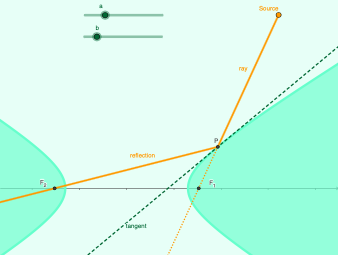
Demonstrates how a light ray reflects from one focus of a hyperbola to the other. This example involves hyperbola geometry and reflection principles. It uses commands like Polygon, Point, Distance, Segment, Ray, Intersect, Tangent, OrthogonalLine, Mirror, and Line in GeoGebra. Suitable for high school mathematics education, particularly in analytic geometry and optics.
GeoGebra Commands & Parameters
Polygon(A, B, D, C) → poly1, a_1, b_1, d_1, c_1Point(d) → EDistance(E, Focus1) → distanceEFocus1Distance(E, Focus2) → distanceEFocus2Segment(E, Focus1) → gSegment(E, Focus2) → iRay(Q, Focus1) → jIntersect(d, j) → G, PTangent(P, d) → l, pOrthogonalLine(P, l) → mMirror(Focus1, m) → Focus1'Line(Focus1, P) → qSegment(Q, P) → rRay(P, Focus1) → nRay(P, Focus2) → s
AI Drawing Prompt Reference
Draw a hyperbola with its two foci marked. Choose a point on the hyperbola and connect it to both foci with line segments. From an external point, draw a ray that intersects the hyperbola at two points; select one intersection as the reflection point. At this point, construct the tangent and normal lines to the hyperbola. Reflect one focus across the normal line to get its mirror image. Draw a line from the original focus to the reflection point, and a segment from the external point to the reflection point. Finally, draw rays from the reflection point to both foci, illustrating how a light ray reflects from one focus to the other.
The prompt above was compiled from the original drawing commands and is for reference only.