
Horizontal Translations: Visualizing Shifts in Functions and Geometry
Loading the math board and drawing, please wait…
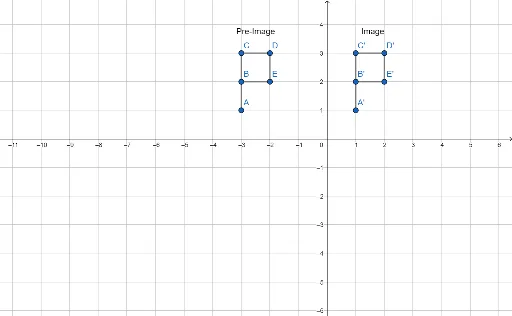
①This GeoGebra example demonstrates horizontal translations, showing how figures and function graphs move along the x-axis while preserving their shape and size. ②Core mathematical concepts include translation transformations in Euclidean geometry and function graph shifts, emphasizing properties such as congruence and parallel equal-length connecting segments. ③Construction highlights: using the Segment command to create segments, defining original points (A, B, C, D, E) and their images (A', B', C', D', E'), generating multiple objects (f, g, h, i, j and their translated counterparts f_1, g_1, h_1, i_1, j_1), and adding text labels (text1, text2) to annotate the translation. ④Suitable for middle and high school students to explore geometric transformations and function graph behavior, and useful as an interactive teaching resource.
GeoGebra Commands & Parameters
Segment(C, D) → fSegment(D, E) → gSegment(E, B) → hSegment(B, C) → iSegment(A, B) → jSegment(C', D') → f_1Segment(D', E') → g_1Segment(E', B') → h_1Segment(B', C') → i_1Segment(A', B') → j_1
AI Drawing Prompt Reference
Draw an irregular pentagon defined by five vertices connected in sequence, forming a closed shape with five sides. Then create a translated copy of this pentagon shifted horizontally to the right, keeping its shape and size unchanged. Connect each original vertex to its corresponding translated vertex with parallel, equal-length line segments to clearly illustrate the translation. Add text labels near the shapes to indicate the original and translated figures, and emphasize the horizontal shift direction and distance. The overall composition should clearly demonstrate the geometric property of translation, suitable for educational purposes.
The prompt above was compiled from the original drawing commands and is for reference only.