
Hexagonal Prism by cosdoba
Loading the math board and drawing, please wait…
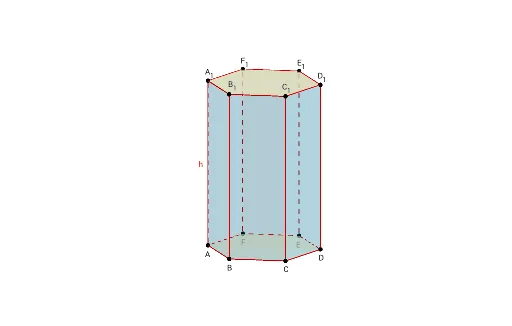
This example demonstrates the construction of a hexagonal prism. It involves key concepts in polygons, solid geometry, and geometric construction. Using GeoGebra commands such as Sequence, Polygon, and Point, the various faces and edges of the hexagonal prism can be dynamically constructed. Suitable for middle school and above students or teachers for teaching or self-study.
GeoGebra Commands & Parameters
Sequence((cos(((2 * π) * k / n)), sin(((2 * π) * k / n)), 0), k, 0, n) → list1Polygon(list1) → poly1Point(list1) → DPoint(list1) → APoint(list1) → EPoint(list1) → FPoint(list1) → BPoint(list1) → CPrism(A, B, C, D, E, F, A_1) → a, B_1, faceBCJI, faceCDKJ, face1, face3, edgeAE, edgeEF, edgeBF, edgeBC, edgeCD, edgeAD, C_1, h, edgeEG, edgeFH, edgeBI, edgeCJ, edgeDK, edge2, edgeGH, edgeHI, edgeIJ, D_1, edgeJK, edge3, E_1, F_1, faceADCBFE, face2, faceEFHG, faceBFHI
AI Drawing Prompt Reference
Draw a regular hexagonal prism. Start with a regular hexagon on the horizontal plane as the base, with six vertices evenly spaced on a circle. From each vertex of the base, extend vertical edges upward to form six rectangular side faces, and connect the top ends to form a congruent hexagon as the top face. The result is a solid prism with parallel and congruent hexagonal bases, six rectangular lateral faces, and twelve edges.
The prompt above was compiled from the original drawing commands and is for reference only.