
Helical Spiral Torus
Loading the math board and drawing, please wait…
In collections
geometriadinamica.es
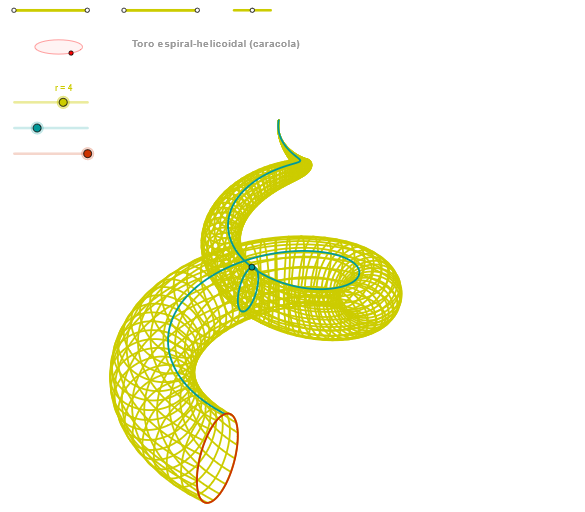
① This example demonstrates a three-dimensional helical spiral torus, a torus (doughnut shape) with a helical curve winding around its surface, creating a spring-like structure around the ring. ② Core mathematical concepts include parametric curves, three-dimensional helix, torus parametric equations, and generating surfaces or loci from families of curves. ③ Construction: Based on the construction summary, GeoGebra commands such as Segment, Point, OrthogonalLine, Circle, Intersect, Ellipse, Angle, CurveCartesian, and Sequence are used. Multiple auxiliary points (e.g., P and Q series) and parameters (e.g., 'paso' step) are defined to generate the skeleton and surface of the helical torus via parametric curves and sequences. ④ Suitable for high school to university-level mathematics, useful for understanding 3D parametric equations, helices, torus geometry, and parametric modeling in dynamic geometry software, also as a visualization or artistic design resource.
GeoGebra Commands & Parameters
Segment(Q5, Q6) → p5Point(p5) → P5Segment(Q3, Q4) → p2Point(p2) → P3Segment(P3, Q4) → p4Point(p4) → P4Segment(Q1, Q2) → p1Point(p1) → P1Segment(P1, Q2) → p3Point(p3) → P2OrthogonalLine(C, xAxis) → zz2Circle(C, 0.62) → zz0Intersect(zz0, zz2, 1) → ZZ4Intersect(zz0, zz2, 2) → ZZ3Ellipse(ZZ3, ZZ4, 0.65) → zElipse2Point(zElipse2) → ZIntersect(zElipse2, zz2) → ZZ7, ZZ8Angle(ZZ8, C, Z) → zAngIncOrthogonalLine(C, yAxis) → zz1Intersect(zz0, zz1, 2) → ZZ2Intersect(zz0, zz1, 1) → ZZ1Ellipse(ZZ1, ZZ2, 0.65) → zElipse1Point(zElipse1) → XYIntersect(zElipse1, zz1) → ZZ5, ZZ6Angle(ZZ6, C, XY) → zAngRotCurveCartesian(((((r / 40 * 2) * 3.14159) * (a + cos(v))) * sin(zAngRot)), (r / 40 * (((((-2 * 3.14159) * (a + cos(v))) * cos(zAngRot)) * sin(zAngInc)) + ((((2 * 3.14159) * sin(v)) - ((b * 2) * 3.14159)) * cos(zAngInc)))) + 5, v, v1, v2) → curva1Segment(ZZ5, ZZ6) → zz4Segment(ZZ7, ZZ8) → zz3Intersect(zElipse2, zElipse1, 1) → zPunto1Intersect(zElipse2, zElipse1, 4) → zPunto2Segment(zPunto1, zPunto2) → zSeg2CurveCartesian((r / 40 * ((((u * cos(u)) * (a + cos(α))) * sin(zAngRot)) + (((u * sin(u)) * (a + cos(α))) * cos(zAngRot)))), (r / 40 * ((((((-u) * cos(u)) * (a + cos(α))) * cos(zAngRot)) * sin(zAngInc)) + ((((u * sin(u)) * (a + cos(α))) * sin(zAngRot)) * sin(zAngInc)) + (((u * sin(α)) - (b * u)) * cos(zAngInc)))) + 5, u, u1, u2) → curva2CurveCartesian((r / 40 * (((((2 * β) * cos((2 * β))) * (a + cos(v))) * sin(zAngRot)) + ((((2 * β) * sin((2 * β))) * (a + cos(v))) * cos(zAngRot)))), (r / 40 * ((((((-2 * β) * cos((2 * β))) * (a + cos(v))) * cos(zAngRot)) * sin(zAngInc)) + (((((2 * β) * sin((2 * β))) * (a + cos(v))) * sin(zAngRot)) * sin(zAngInc)) + ((((2 * β) * sin(v)) - ((b * 2) * β)) * cos(zAngInc)))) + 5, v, v1, v2) → a1Sequence(CurveCartesian[(r / 40 * ((((u * cos(u)) * (a + cos(v))) * sin(zAngRot)) + (((u * sin(u)) * (a + cos(v))) * cos(zAngRot)))), (r / 40 * ((((((-u) * cos(u)) * (a + cos(v))) * cos(zAngRot)) * sin(zAngInc)) + ((((u * sin(u)) * (a + cos(v))) * sin(zAngRot)) * sin(zAngInc)) + (((u * sin(v)) - (b * u)) * cos(zAngInc)))) + 5, v, v1, v2], u, u1, u2, paso) → list2Sequence(CurveCartesian[(r / 40 * ((((u * cos(u)) * (a + cos(v))) * sin(zAngRot)) + (((u * sin(u)) * (a + cos(v))) * cos(zAngRot)))), (r / 40 * ((((((-u) * cos(u)) * (a + cos(v))) * cos(zAngRot)) * sin(zAngInc)) + ((((u * sin(u)) * (a + cos(v))) * sin(zAngRot)) * sin(zAngInc)) + (((u * sin(v)) - (b * u)) * cos(zAngInc)))) + 5, u, u1, u2], v, v1, v2, (3 * paso)) → list1
AI Drawing Prompt Reference
Draw a helical spiral torus, resembling a doughnut with a spiral curve winding around its surface, creating a spring-like structure. The spiral is generated by parametric equations and rotates continuously on the torus. First, define the torus center and radius, then create the spiral path using parametric curves, and finally combine the spiral with the torus surface to form a three-dimensional solid.
The prompt above was compiled from the original drawing commands and is for reference only.