
Head-to-Tail Vector Addition Demonstration
Loading the math board and drawing, please wait…
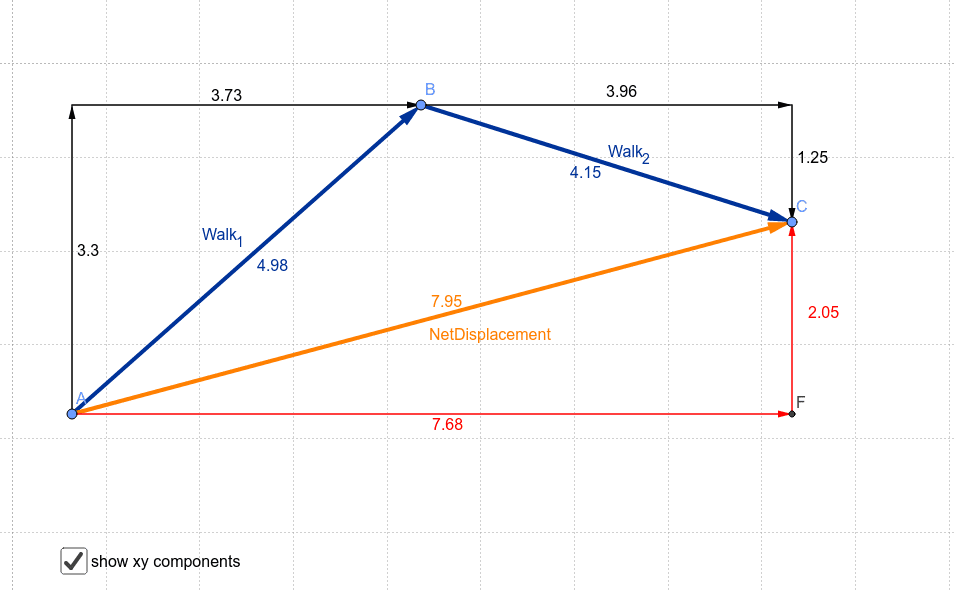
This GeoGebra example dynamically illustrates the head-to-tail method of adding vectors, showing how multiple vectors placed sequentially tip-to-tail produce a resultant vector (net displacement) from the initial start point to the final end point. The core mathematical concepts include vector addition, displacement composition, and geometric representation of vectors, involving free vectors, position vectors, and vector decomposition. Construction highlights: the Vector command is used to create vector objects (e.g., Walk_1, Walk_2, NetDisplacement), the Segment command draws auxiliary segments, and multiple points (A, B, C, D, E, F) and vectors (u, v, w, a, c, b) are defined to build the tip-to-tail path, possibly with sliders or dynamic points to adjust vector magnitudes and directions. This is suitable for high school or early college students learning vector operations, displacement synthesis in physics, and gaining geometric intuition for the commutative and associative properties of vector addition.
GeoGebra Commands & Parameters
Vector(A, B) → Walk_1Vector(B, C) → Walk_2Vector(A, C) → NetDisplacementSegment(A, B) → fSegment(B, C) → gSegment(A, C) → hSegment(A, D) → iSegment(D, B) → jSegment(A, F) → kSegment(F, C) → lSegment(B, E) → mSegment(E, C) → nVector(A, D) → uVector(D, B) → vVector(A, F) → wVector(F, C) → aVector(B, E) → cVector(E, C) → b