
Graphs Describing Motion - Task
Loading the math board and drawing, please wait…
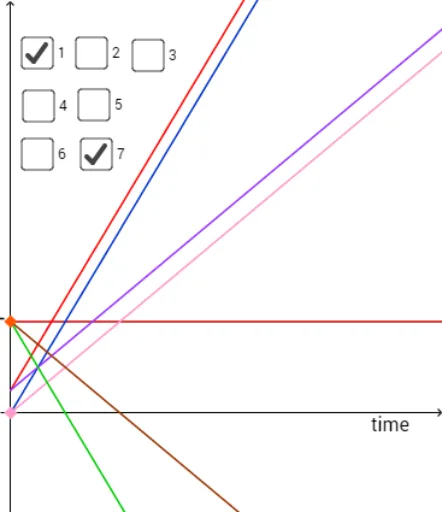
This example demonstrates how to describe motion trajectories using graphs, focusing on parametric curves and geometric transformations. Key math concepts include parametric equations, coordinate geometry, geometric transformations, and triangle properties. Construction highlights involve commands like Line, Point, OrthogonalLine, Intersect, Polygon, Segment, RotateText in GeoGebra to build graphs, intersections, and transformed shapes. Suitable for high school and above, illustrating the application of parametric equations in motion description and the visual effects of geometric transformations.
GeoGebra Commands & Parameters
Line(C, xAxis) → iLine(D, i) → jPoint(i) → EOrthogonalLine(E, i) → kIntersect(j, k) → FPoint(i) → HOrthogonalLine(H, i) → lPoint(l) → IOrthogonalLine(I, l) → qPoint(l) → JOrthogonalLine(J, l) → rPoint(q) → LOrthogonalLine(L, q) → sIntersect(s, r) → MPolygon(I, L, M, J) → poly1, i_1, l_1, m_1, j_1Intersect(i, l_1) → NIntersect(j, l_1) → OIntersect(j_1, j) → PSegment(H, N) → t_1Segment(P, O) → cIntersect(d, i_1) → QIntersect(m_1, d) → RSegment(Q, R) → eLine(e_2, xAxis) → bLine(c_1, xAxis) → k_1Line(g_4, xAxis) → n_1Line(a_3, xAxis) → i_2Line(b_5, xAxis) → j_2Line(f_4, xAxis) → k_2Point(yAxis) → A_1OrthogonalLine(A_1, yAxis) → l_2Point(yAxis) → B_1OrthogonalLine(B_1, yAxis) → m_2Point(m_2) → C_1OrthogonalLine(C_1, m_2) → n_2Point(m_2) → D_1OrthogonalLine(D_1, m_2) → p_2Intersect(n_2, l_2) → E_1Intersect(p_2, l_2) → F_1Polygon(D_1, C_1, E_1, F_1) → poly2, d_5, c_2, e_3, f_5Intersect(i_2, n_2) → G_1Intersect(j_2, n_2) → H_1Intersect(b, n_2) → I_1Intersect(xAxis, n_2) → J_1Intersect(k_1, n_2) → K_1Intersect(k_2, n_2) → L_1Intersect(n_1, n_2) → M_1Intersect(n_1, p_2) → N_1Intersect(k_2, p_2) → O_1Intersect(k_1, p_2) → P_1Intersect(xAxis, b) → Q_1Intersect(xAxis, p_2) → R_1Intersect(b, j_2) → S_1Intersect(j_2, p_2) → T_1Intersect(b, p_2) → U_1Intersect(i_2, p_2) → V_1Segment(V_1, G_1) → q_2Segment(T_1, H_1) → r_2Segment(U_1, I_1) → s_2Segment(R_1, J_1) → t_2Segment(P_1, K_1) → a_2Segment(O_1, L_1) → b_2Segment(N_1, M_1) → h_3Segment(F_1, E_1) → i_3RotateText("position", 90°) → text4