
Graphing Quadratic Functions by Tim Brzezinski
Loading the math board and drawing, please wait…
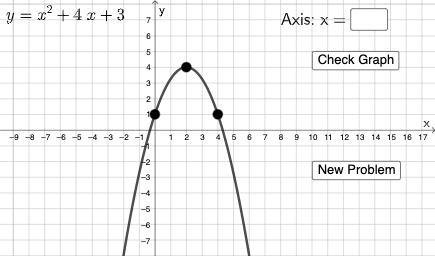
This example demonstrates the graphing of quadratic functions. The key mathematical concepts involved include quadratic functions, function graphs, and standard forms. Construction involves using GeoGebra commands such as Random, Distance, FitPoly, etc. Suitable for high school mathematics teaching or self-study.
GeoGebra Commands & Parameters
Random(-5, 5) → cRandomElement({-3, -2, -1, 1, 2, 3, 4}) → aRandom(-5, 5) → dDistance(A, yAxis) → bRandomElement({-3, -2, -1, 1, 2, 3, -4, 4, 5, -5}) → eFitPoly({A, B, H}) → gExpand(g) → pRandom(1, 2) → nFitPoly({F, C, I}) → rTextfield(k) → InputBox1If(c1, "√", "×") → text3
AI Drawing Prompt Reference
Draw a quadratic function graph with randomly generated coefficients, displayed in expanded standard form. Include three key points on the curve, where two define the function and the third verifies it. Also show a segment whose length from the y-axis is a coefficient. Add an input box for parameter adjustment and a symbol (check or cross) indicating a condition. Arrange with coordinate axes, the curve, points, and interactive controls.
The prompt above was compiled from the original drawing commands and is for reference only.