
Graphing Perpendicular Lines in the Coordinate Plane
Loading the math board and drawing, please wait…
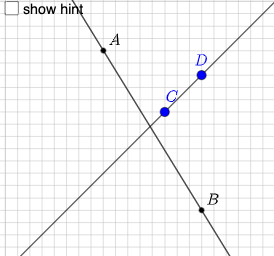
This example demonstrates how to graph perpendicular lines in the coordinate plane. Key mathematical concepts include the slope of a line and the properties of perpendicular lines. Using GeoGebra commands such as Random, Sequence, Union, and Line, dynamic generation of perpendicular lines and their slope relationships can be observed. Suitable for students at the junior high school level and above, focusing on coordinate geometry.
GeoGebra Commands & Parameters
Random(-9, 9) → aRandom(-9, 9) → bSequence(i, i, b + 1, 9, 1) → l4Sequence(i, i, -9, b - 1, 1) → l3Union(l3, l4) → yListSequence(i, i, a + 1, 9, 1) → l2Sequence(i, i, -9, a - 1, 1) → l1Union(l1, l2) → xListRandomElement(xList) → cRandomElement(yList) → dLine(B, A) → fLine(C, D) → gIf(n ≟ 1, "∥", "⟂") → text1If(y(B) > y(A), (x(B), y(A)), (x(A), y(B))) → EPolygon(A, E, B) → t1, b_1, a_1, e_1If(y(D) > y(C), (x(D), y(C)), (x(C), y(D))) → FPolygon(D, F, C) → t2, c_1, d_1, f_1Segment(A, E) → jSegment(E, B) → kSegment(D, F) → lSegment(F, C) → mSlope(f) → oSlope(g) → pIf(c1, "√", "X") → text2If(c2, "√", "X") → text4Textfield(q) → InputBox1Textfield(r) → InputBox2If(c3, "√", "X") → text5
AI Drawing Prompt Reference
Draw two perpendicular lines on a coordinate plane. Randomly generate points A and B. Use sequence and union commands to create the perpendicular lines. Observe the slope relationship between the lines and display it in the graph. Ensure the graph is clear to help understand the properties of perpendicular lines.
The prompt above was compiled from the original drawing commands and is for reference only.