
Graphing Linear Inequalities in Two Variables and Finding the Solution Region
Loading the math board and drawing, please wait…
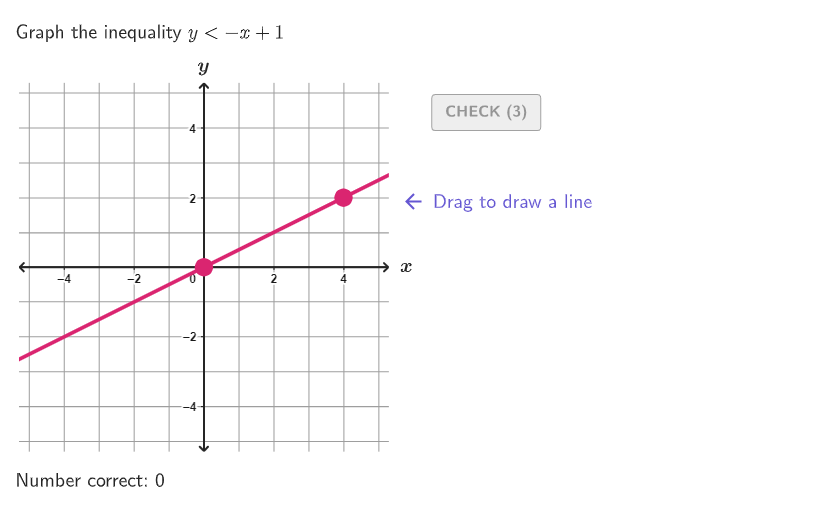
This example demonstrates how to graph linear inequalities in two variables on a 2D coordinate plane and determine the solution set by checking whether points lie in the correct region (including the boundary when appropriate). It focuses on key concepts such as linear inequalities, half-planes/solution regions, boundary lines (solid vs. dashed for ≤/≥ vs. </>), and graphical reasoning for solving bivariate linear inequalities. In construction, it uses GeoGebra objects and commands reflected in the build: Inequality to model the statement, Line to create the boundary line, and IsInRegion with test points (e.g., TestPoint / TestPointInReg) to decide membership in the solution region. It employs Split for dividing objects along boundaries, and geometry utilities like Segment, Polygon, and IntersectPath to construct and display region visuals. It also includes logic and branching tools such as Sequence/If/IndexOf/AreEqual to manage cases, plus Textfield/Text and Translate for explanatory labels and feedback. The learning experience is guided by onboardingStage and hint-related objects (showhint1, onboardingTextOffset). Suitable for grades 9–12 and for teaching interactive visualization of inequality solution regions.
GeoGebra Commands & Parameters
Sequence(Random[0, 99] / 100, A, 1, 200) → allRandomSeeds, {0.39, 0.65, 0.37, 0.82, 0.69, 0.31, 0.54, 0.23, 0.13, 0.95, 0.22, 0.94, 0.8, 0.59, 0.16, 0.17, 0.95, 0.96, 0.11, 0.03, 0.62, 0.42, 0.72, 0.7, 0.15, 0.93, 0.34, 0.58, 0.85, 0.92, 0.12, 0.31, 0.26, 0.11, 0.82, 0.73, 0.76, 0.16, 0.38, 0.19, 0.51, 0.84, 0.98, 0.97, 0.53, 0.87, 0.02, 0.79, 0.12, 0.14, 0.47, 0.23, 0.86, 0, 0.39, 0.54, 0.35, 0.89, 0.49, 0.76, 0.43, 0.47, 0.06, 0.55, 0.71, 0.39, 0.5, 0.11, 0.65, 0.68, 0.81, 0.12, 0.2, 0.91, 0.49, 0.23, 0.69, 0.72, 0.17, 0.9, 0.89, 0.12, 0, 0.92, 0.53, 0.44, 0.56, 0.41, 0.93, 0.54, 0.43, 0.12, 0.5, 0.83, 0.62, 0.31, 0.01, 0.49, 0.5, 0.59, 0.56, 0.62, 0.36, 0.02, 0.07, 0.5, 0.93, 0.49, 0.17, 0.51, 0.56, 0.95, 0.22, 0.63, 0.71, 0.45, 0.93, 0.44, 0.57, 0.87, 0.31, 0.79, 0.78, 0.53, 0.75, 0.46, 0.33, 0.47, 0.05, 0.41, 0.36, 0.06, 0.57, 0.76, 0.66, 0.21, 0.89, 0.96, 0.25, 0.63, 0.2, 0.07, 0.32, 0.27, 0.06, 0.22, 0.9, 0.78, 0.93, 0.38, 0.69, 0.68, 0.14, 0.78, 0.51, 0.84, 0.21, 0.21, 0.39, 0.7, 0.19, 0.48, 0.21, 0.27, 0.65, 0.87, 0.64, 0.12, 0.06, 0.37, 0.93, 0.44, 0.9, 0.09, 0.24, 0.92, 0.31, 0.49, 0.62, 0.32, 0.26, 0.7, 0.74, 0.72, 0.22, 0.63, 0.86, 0.8, 0.76, 0.71, 0.03, 0.98, 0.34, 0.24, 0.9, 0.19, 0.43, 0.78, 0.73, 0.09}Take(allRandomSeeds, randIndex, randIndex + numRandoms - 1) → currentRandomSeedsIf(currentRandomSeeds(3) ≥ 0.5, 1, 2) → CaseLine((If[randomNum1 ≟ 0, 1, randomNum1], 0), (0, If[randomNum2 ≟ 0, 1, randomNum2])) → lineCase1If(Case ≟ 1, AreCollinear[TestPoint, Intersect[lineCase1, xAxis], Intersect[lineCase1, yAxis]], AreCollinear[TestPoint, (0, randomNum2), (1, randomNum1 + randomNum2)]) → TestPointInLineIf(Mod[Inequality, 2] ≟ 1, y < (randomNum1 * x) + randomNum2, y > (randomNum1 * x) + randomNum2) → ineq2Element({"≤", "≥", "<", ">"}, Inequality) → InequalityTextIf(invert, If[Mod[Inequality, 2] ≟ 1, y > (Slope[lineCase1] * x) + If[randomNum2 ≟ 0, 1, randomNum2], y < (Slope[lineCase1] * x) + If[randomNum2 ≟ 0, 1, randomNum2]], If[Mod[Inequality, 2] ≟ 1, y < (Slope[lineCase1] * x) + If[randomNum2 ≟ 0, 1, randomNum2], y > (Slope[lineCase1] * x) + If[randomNum2 ≟ 0, 1, randomNum2]]) → ineq1IsInRegion(TestPoint, If[Case ≟ 1, ineq1, ineq2]) → TestPointInRegSplit(TextCase1, {"≥", "≤", ">", "<"}) → Text1SplitZip(AreCollinear[PP, (0, randomNum2), (1, randomNum1 + randomNum2)], PP, TestPoints) → InLineCase2Zip(AreCollinear[PP, Intersect[lineCase1, xAxis], Intersect[lineCase1, yAxis]], PP, TestPoints) → InLineCase1IndexOf(false, If[Case ≟ 1, InLineCase1, InLineCase2]) → pointNumElement({"Drag to draw a line", "Click to change the line style", "Click to select a region"}, onboardingStage) → onboardingTextLine(P1, P2) → studLineIf(Defined[Slope[studLine]], y < (Slope[studLine] * x) + studLine(0) ∧ (-GVsize) ≤ x ≤ GVsize ∧ (-GVsize) ≤ y ≤ GVsize, x(P1) < x < GVsize ∧ (-GVsize) ≤ y ≤ GVsize) → side2Zip(IsInRegion[PP, side2], PP, TestPoints) → InSide2If(Defined[Slope[studLine]], y > (Slope[studLine] * x) + studLine(0) ∧ (-GVsize) ≤ x ≤ GVsize ∧ (-GVsize) ≤ y ≤ GVsize, (-GVsize) < x < x(P1) ∧ (-GVsize) ≤ y ≤ GVsize) → side1Zip(IsInRegion[PP, side1], PP, TestPoints) → InSide1AreEqual(studLine, If[Case ≟ 1, lineCase1, lineCase2]) → correct1Zip(IsInRegion[PP, ineq2], PP, TestPoints) → InIneq2Zip(IsInRegion[PP, ineq1], PP, TestPoints) → InIneq1Textfield(input1) → InputBox1Textfield(input2) → InputBox2Corner(5) → layoutAppSizePointToPixels(Corner[onboardingDisplayText, 2], Corner[1], Corner[3], Corner[5]) → layoutOnboardingPolygon({((-GVsize), (-GVsize)), (GVsize, (-GVsize)), (GVsize, GVsize), ((-GVsize), GVsize)}) → q1Text("x", (GVsize + 0.5, 0.1), true, true, 0, 0) → text1Text("y", (0, GVsize + 0.5), true, true, 0, 0) → text2Translate(hGL, Vector[(Vector[Corner[4], Corner[1]] / 500 * 16)]) → hGL'Translate(vGL, Vector[(Vector[Corner[1], Corner[2]] / 800 * 16)]) → vGL'onboardingTextOffset(Corner[onboardingText, 1], Corner[onboardingText, 3], onboardingCase, Corner[1], Corner[3], Corner[5]) → OnboardingTextOffsetcirclePixels(P1, 7 + (7 * pulsing), Corner[1], Corner[3], Corner[5]) → pulsingObjectcirclePixels(P2, 7 + (7 * pulsing), Corner[1], Corner[3], Corner[5]) → pulsingObject2IntersectPath(studLine, q1) → fexpandSegment(Vertex[f, 1], Vertex[f, 2], (7 * pulsing), Corner[1], Corner[3], Corner[5]) → pulsingObject3Split(Text1Replace, {"≥", "≤", ">", "<"}) → l1Split(TextCase2, {"≥", "≤", ">", "<"}) → Text2SplitReplaceAll(ReplaceAll[Text1Split(1), "x", (("(" * x(TestPoint)) * ")")], "y", (("(" * y(TestPoint)) * ")")) → text3Segment(((-GVsize) + a, 0), (GVsize - a, 0)) → fakeXAxisSegment((0, (-GVsize) + a), (0, GVsize - a)) → fakeYAxiscirclePixels(TestPoint, 9 + (7 * pulsing), Corner[1], Corner[3], Corner[5]) → pulsingSol
AI Drawing Prompt Reference
Graph linear inequalities on a 2D coordinate plane, showing boundary lines and solution regions. Generate random points and lines, then determine the type of boundary line (solid or dashed) based on the inequality. Use test points to check if they lie within the solution region, highlighting them accordingly. Add axes, labels, and explanatory text to clarify the method of solving and the meaning of the solution region.
The prompt above was compiled from the original drawing commands and is for reference only.