
Graphically Target the Solution of a Linear Equation System and Verify the Inter
Loading the math board and drawing, please wait…
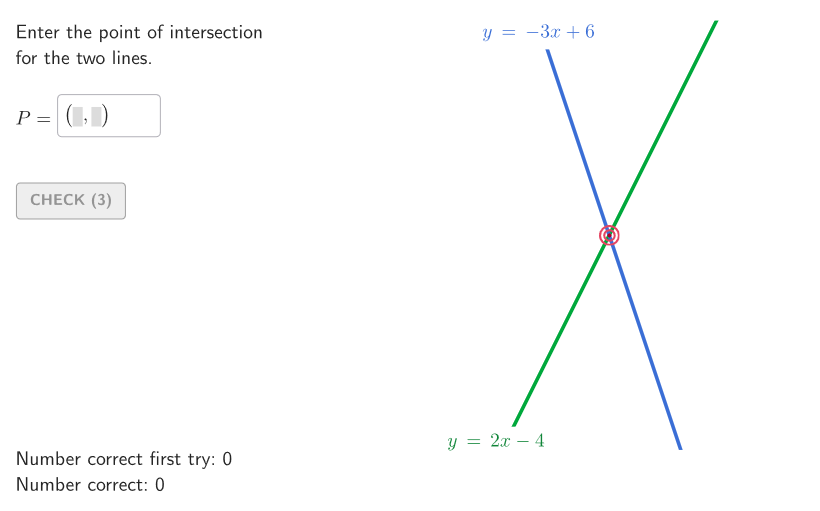
This example demonstrates how to solve a system of linear equations by graphing two lines on the same coordinate plane, targeting their intersection point, and verifying that the intersection coordinates satisfy both equations. It centers on key algebra concepts: systems of linear equations, solutions as common points, the relationship between a linear equation and its corresponding line, and substitution-based verification. Construction and interaction are supported by GeoGebra logic and objects: Shuffle enables randomized or parameterized variations, Element is used to retrieve relevant objects, Segment/Polygon/Corner help build the diagram and visual structure, and Textfield/Text are used to display equations and the computed solution. Conditional control via If and validate supports checking student inputs, while showanswer/showsolution and btnValidate manage answer reveal and correctness feedback; showhint helps guide learners. The activity is well suited for grades 6–8, especially for graphical problem solving of linear systems and classroom practice.
GeoGebra Commands & Parameters
Shuffle(Join[Sequence[Sequence[(j, k), j, -7, 7, 1], k, -7, 7, 1]]) → allP, {(2, 0), (4, -7), (0, 7), (1, 2), (2, -7), (-7, -6), (-4, 6), (6, -7), (-5, -5), (-3, -6), (-2, -3), (-7, -5), (3, 3), (-5, 6), (-1, 4), (-4, -1), (5, -3), (-7, 0), (2, 5), (2, -6), (-4, -2), (3, 5), (7, -1), (6, 3), (-6, -2), (-6, -7), (1, -5), (5, 6), (1, 6), (-1, -3), (2, 2), (-3, -4), (1, -1), (-2, 3), (4, 7), (-1, 2), (-6, 3), (4, -4), (-7, 6), (-6, 0), (-7, -7), (-4, 2), (-5, -6), (-3, 7), (-5, 3), (3, 6), (2, -4), (-1, -7), (5, 2), (5, -7), (6, -4), (2, -3), (3, -5), (4, -3), (-5, 7), (7, 0), (6, 6), (0, 5), (-7, 3), (7, -6), (-3, -1), (-7, 5), (0, 0), (4, 4), (1, 1), (0, 3), (6, 0), (-1, -5), (5, 1), (-6, -4), (6, 4), (2, 4), (6, 7), (-1, 3), (4, 6), (7, 6), (1, 0), (-6, -1), (-3, 1), (7, 2), (4, 3), (1, -3), (3, -2), (-6, -6), (-6, -3), (-1, 5), (-6, 5), (6, 5), (6, -1), (-6, 6), (-2, 6), (-6, 7), (2, -2), (-6, 4), (-2, -5), (-4, 0), (-4, -6), (-2, 7), (-3, -3), (1, 4), (-5, -7), (-4, 5), (4, -1), (-3, 5), (-2, 5), (-2, -4), (-4, 3), (0, 2), (-7, 4), (7, -2), (5, 7), (-2, 4), (4, -5), (1, 7), (-7, -3), (-3, -5), (0, -6), (3, -1), (-6, 2), (7, 7), (5, -2), (-1, -6), (1, -6), (6, -6), (-5, -2), (6, 2), (-1, 7), (5, -1), (7, 1), (7, -5), (-2, -2), (-7, -2), (-4, 1), (5, -4), (3, 4), (5, -6), (-6, 1), (-1, -1), (-7, 1), (-5, -4), (0, 4), (-5, 2), (5, 0), (-1, 6), (3, -4), (-4, -7), (0, -5), (0, 1), (2, -1), (-7, -1), (-5, 0), (-4, 7), (-3, 6), (6, -5), (-5, 4), (1, -2), (1, -4), (5, -5), (-7, 2), (7, 3), (-6, -5), (5, 5), (-1, -2), (3, 7), (1, -7), (-3, -7), (5, 3), (-1, -4), (-2, -7), (4, 5), (-3, 0), (-5, -3), (-3, 4), (7, -7), (2, 3), (6, -3), (3, -7), (-3, 3), (4, 1), (0, -2), (-5, -1), (5, 4), (4, 0), (0, -1), (-5, 5), (1, 5), (-4, 4), (-3, -2), (1, 3), (2, -5), (-7, 7), (-4, -5), (3, 0), (-1, 1), (2, 7), (4, -2), (7, 4), (0, 6), (2, 1), (-2, 2), (-2, -6), (-2, 1), (6, -2), (0, -3), (-7, -4), (-2, -1), (7, -3), (4, 2), (0, -7), (0, -4), (3, 1), (7, -4), (3, 2), (-2, 0), (2, 6), (-5, 1), (-3, 2), (3, -6), (-4, -3), (3, -3), (7, 5), (4, -6), (-1, 0), (-4, -4), (6, 1)}Element(allP, Mod[countQuestion, Length[allP]] + 1) → SOLPShuffle(Sequence[t, t, -4, 4, 1]) → allM, {-3, 2, 3, -2, -4, 1, 4, 0, -1}Element(allM, Mod[m2Count, Length[allM]] + 1) → m2Element(allM, Mod[countQuestion, Length[allM]] + 1) → m1Textfield(inputB) → InputBoxBPolygon(Zip[PixelsToPoint[Corner[1], Corner[3], Corner[5], A], A, {(pixelsLeft, pixelsTop), (pixelsLeft, y(Corner[5]) - pixelsBottom), Corner[5] - (pixelsRight, pixelsBottom), (x(Corner[5]) - pixelsRight, pixelsTop)}]) → borderBoxCorner(5) → layoutAppSizeonboardingTextOffset(Corner[onboardingText, 1], Corner[onboardingText, 3], onboardingCase, Corner[1], Corner[3], Corner[5]) → OnboardingTextOffsetTextfield(STUDP) → InputBoxATextfield(inputC) → InputBoxCSegment((-10.8, 0), (10.8, 0)) → fakeXSegment((0, -10.8), (0, 10.8)) → fakeYPolygon(PC, Mirror[PC, yAxis], Mirror[PC, (0, 0)], Mirror[PC, xAxis]) → peep, bottomPeep, rightPeep, topPeep, leftPeepElement(RemoveUndefined[{Intersect[r1, topPeep], Intersect[r1, rightPeep], Intersect[r1, leftPeep]}], 1) → LR1Element(RemoveUndefined[{Intersect[r2, bottomPeep], Intersect[r2, leftPeep], Intersect[r2, rightPeep]}], 1) → LR2Zip({Segment[(k, -10.5), (k, 10.5)], Segment[(-10.5, k), (10.5, k)]}, k, -10…10) → squareGridSegmIf(x(LR2) > 5, (-6, 1), (-3, 1)) → OFFLR2If(x(LR1) > 5, (-6, -1), (-3, 0)) → OFFLR1
AI Drawing Prompt Reference
Draw two randomly generated lines on a coordinate plane, where their intersection point represents the solution to a system of linear equations. Start by creating a grid, then randomly select pairs of coordinates to define the endpoints of the two lines and draw them. Next, draw two auxiliary line segments on the axes and find the intersection points of these segments with the two lines. Finally, verify whether the equations of the lines satisfy the system of linear equations using these intersection points.
The prompt above was compiled from the original drawing commands and is for reference only.