
Graphical Demonstration of Complex Number Addition by Ann-Christin Holzinger
Loading the math board and drawing, please wait…
In collections
Complex numbers
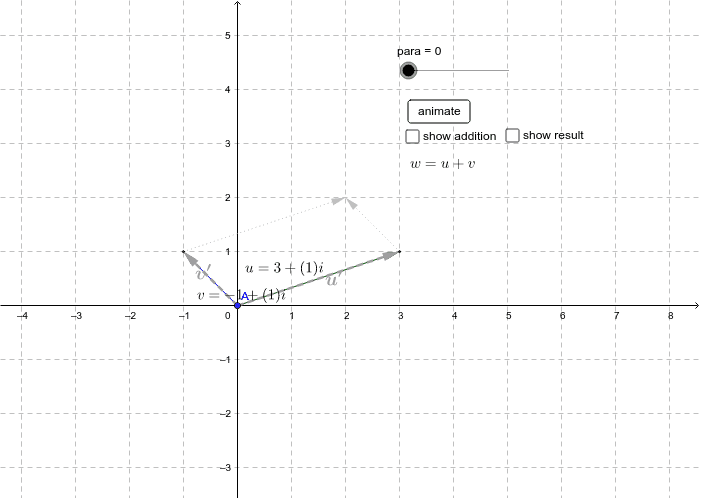
This example visually demonstrates the addition of two complex numbers using geometric methods. It involves core mathematical concepts such as the geometric representation of complex numbers, vector addition, and the parallelogram law. The construction utilizes GeoGebra commands and objects like Point, Vector, Translate, Segment, Intersect, and Midpoint. It is suitable for high school mathematics education, helping students intuitively understand the geometric meaning of complex number addition and deepening their comprehension of complex operations.
GeoGebra Commands & Parameters
Point(yAxis) → AVector(A, B) → vVector(A, C) → uTranslate(A'', u) → A'''Segment(A'', A''') → iTranslate(A', v) → B'Segment(A', B') → jIntersect(i, j) → XMidpoint(A, B) → DMidpoint(C, A) → EVector(A', B') → v'Midpoint(A', B') → FVector(A, X) → wVector(A'', A''') → u'Midpoint(A'', A''') → GTranslate(C, v) → C'Vector(C, C') → kTranslate(B, u) → B'_1Vector(B, B'_1) → l
AI Drawing Prompt Reference
Draw the geometric addition of two complex numbers by first taking point A on the y-axis, then drawing vectors v and u from A, followed by translating and constructing midpoints to get vectors v' and u', and finally using intersection to create vectors w and u', and through translation, obtain vectors k and l, illustrating the geometric meaning of complex number addition.
The prompt above was compiled from the original drawing commands and is for reference only.