
Gradient Intercept Form of Line Equation
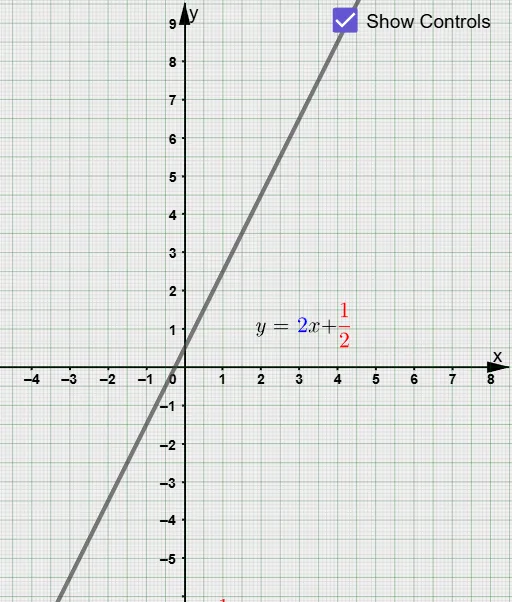
Loading the math board and drawing, please wait…
This example demonstrates the gradient intercept form of a line equation, involving key mathematical concepts such as line equations, slope, and y-intercept. Using GeoGebra commands like Sequence, Point, and Line, it dynamically shows the process of drawing a line. Suitable for middle school and above students or teachers for classroom demonstrations or self-review.
GeoGebra Commands & Parameters
Sequence(Segment[(x(S_{grid}) + (int_{grid} * i), y(S_{grid})), (x(T_{grid}) + (int_{grid} * i), y(T_{grid}))], i, 0, (x(U_{grid}) - x(T_{grid})) / int_{grid}) → list_{gridx}Sequence(Segment[(x(T_{grid}), y(T_{grid}) + (int_{grid} * i)), (x(U_{grid}), y(U_{grid}) + (int_{grid} * i))], i, 0, (y(S_{grid}) - y(T_{grid})) / int_{grid}) → list_{gridy}Point(f) → APoint(f) → BIf(m ≥ 0, If[x(A) < x(B), (x(B), y(A)), (x(A), y(B))], If[x(A) < x(B), (x(A), y(B)), (x(B), y(A))]) → F_{AB}If(x(A) < x(B), Vector[A, F_{AB}], Vector[F_{AB}, A]) → uIf(x(A) > x(B), Vector[B, F_{AB}], Vector[F_{AB}, B]) → vIf(m ≤ 0, If[x(B) < x(A), Midpoint[B, F_{AB}], Midpoint[A, F_{AB}]], If[x(B) < x(A), Midpoint[A, F_{AB}], Midpoint[B, F_{AB}]]) → M_{txtrise}If(m ≤ 0, If[x(B) < x(A), Midpoint[A, F_{AB}], Midpoint[B, F_{AB}]], If[x(B) < x(A), Midpoint[B, F_{AB}], Midpoint[A, F_{AB}]]) → M_{txtrun}Intersect(f, yAxis) → CTextfield(f) → InputBox1If(m < 0, If[x(A) ≤ x(B), y(F_{AB}) - y(A), y(F_{AB}) - y(B)], If[x(A) ≤ x(B), y(B) - y(F_{AB}), y(A) - y(F_{AB})]) → changeinyIf(m < 0, If[x(A) ≤ x(B), x(B) - x(F_{AB}), x(A) - x(F_{AB})], If[x(A) ≤ x(B), x(F_{AB}) - x(A), x(F_{AB}) - x(B)]) → changeinxLine((-3, g_o(-3)), (3, g_o(3))) → gTextfield(textinputequation) → InputBox2Textfield(m) → InputBox3Textfield(c) → InputBox4
AI Drawing Prompt Reference
Draw a line with a slope of -2 and y-intercept of 3. First, draw the x-axis and y-axis. Then, use the slope and y-intercept to determine two points on the line and connect them to form the line. Choose one point as the starting point and another as the ending point on the line, calculate the slope and y-intercept between these two points, and label the slope and y-intercept on the line.
The prompt above was compiled from the original drawing commands and is for reference only.