
Golden Rectangle by Elżbieta Paluczek
Loading the math board and drawing, please wait…
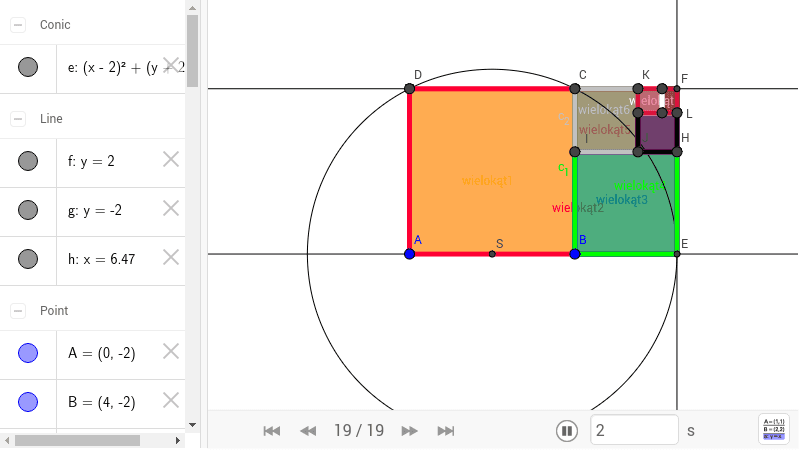
This example demonstrates the construction and properties of a golden rectangle. It involves core mathematical concepts such as rectangle, midpoint, circle, line, intersection, and orthogonal line. Construction highlights include using Polygon, Midpoint, Circle, Line, Intersect, and OrthogonalLine commands. Suitable for high school mathematics students and geometry enthusiasts.
GeoGebra Commands & Parameters
Polygon(A, B, 4) → wielokąt1, a, b, c, d, C, DMidpoint(a) → SCircle(S, C) → eLine(D, C) → fLine(A, B) → gIntersect(e, g, 2) → EOrthogonalLine(E, g) → hIntersect(f, h) → FPolygon(A, E, F, D) → wielokąt2, a_1, f_1, g_1, d_1Polygon(B, E, 4) → wielokąt3, i, j, k, l, H, IPolygon(C, B, E, F) → wielokąt4, c_1, b_1, f_2, g_2Polygon(C, I, 4) → wielokąt5, m, n, p, q, J, KPolygon(C, I, H, F) → wielokąt6, c_2, i_1, h_1, g_3Polygon(J, H, 4) → wielokąt7, r, s, t, e_1, L, MPolygon(K, J, H, F) → wielokąt8, k_1, j_1, h_2, g_4Polygon(K, M, 4) → wielokąt9, l_1, m_1, n_1, p_1, N, OPolygon(K, M, L, F) → wielokąt10, k_2, m_2, l_2, g_5
AI Drawing Prompt Reference
Draw a square, find the midpoint of one side, draw a circle centered at this midpoint with a radius equal to half the diagonal of the square, then find the intersection points of this circle with one side of the square. Draw a line perpendicular to this side through one of the intersection points. Use these points to construct additional quadrilaterals, progressively expanding the shape into a complex structure with nested quadrilaterals, demonstrating the construction and properties of the golden rectangle.
The prompt above was compiled from the original drawing commands and is for reference only.