
Golden ratio in Regular Pentagon
Loading the math board and drawing, please wait…
In collections
STEAM like Leonardo
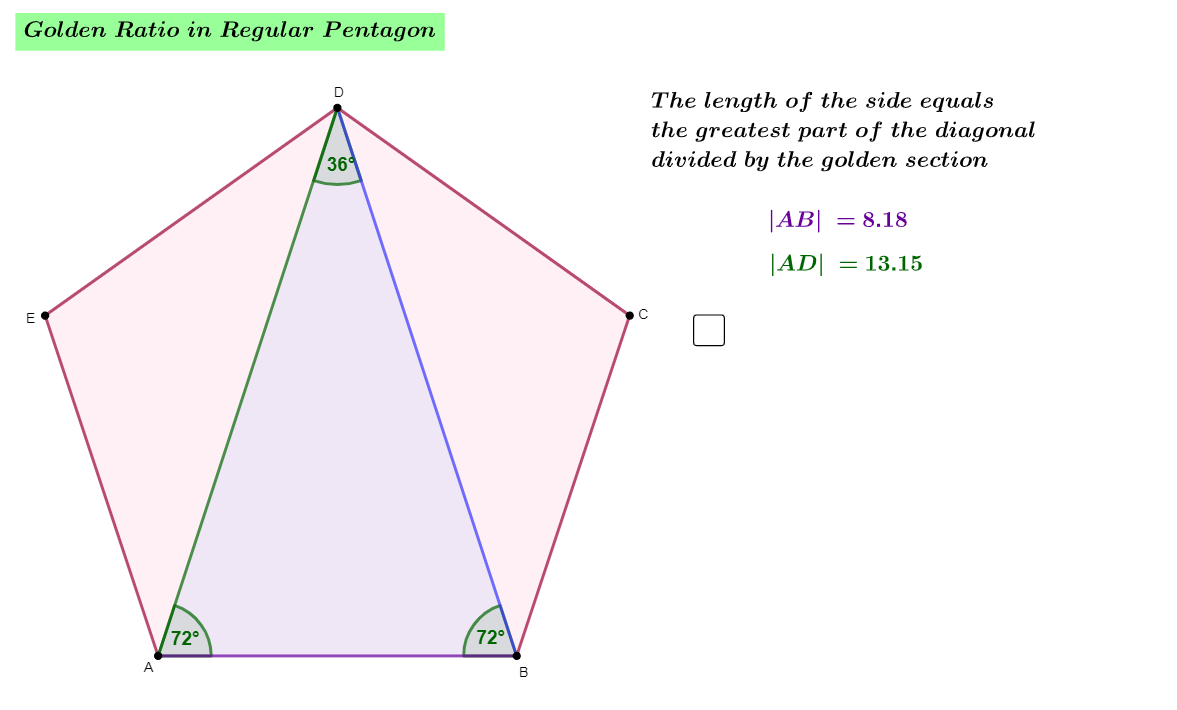
This example demonstrates the golden ratio in a regular pentagon. The key mathematical concepts involve geometric proportion, similar triangles, and golden division. Construction involves GeoGebra commands such as Segment, Circle, Intersect to create the pentagon and related figures. Suitable for middle or high school mathematics education to understand geometric proportions and properties.
GeoGebra Commands & Parameters
Segment(A, B) → fCircle(A, B) → cCircle(B, A) → dIntersect(c, d, 2) → C_{1}Intersect(c, d, 1) → D_{1}Line(D_{1}, C_{1}) → gCircle(C_{1}, B) → eIntersect(c, e, 2) → E_{1}Intersect(d, e, 1) → FIntersect(e, g, 1) → GLine(E_{1}, G) → hLine(F, G) → iIntersect(c, i, 2) → EIntersect(d, h, 2) → CCircle(E, A) → kCircle(C, B) → pIntersect(k, p, 1) → DPolygon(D, C, B, A, E) → wielokąt1, j, i_1, b, a, h_1Polygon(D, A, B) → t1, b_1, j_1, a_1Angle(A, D, B) → αAngle(D, B, A) → βAngle(B, A, D) → γ
AI Drawing Prompt Reference
Draw a regular pentagon and illustrate the golden ratio within it. Start with a line segment, then create two circles centered at each endpoint with the segment as radius. Their intersections define a line. Use one intersection as a center to draw another circle, intersecting previous circles to locate the pentagon's vertices. Connect these vertices to form the pentagon, then draw a diagonal to create a triangle. Mark the three interior angles of this triangle to show the golden ratio proportion.
The prompt above was compiled from the original drawing commands and is for reference only.