
Golden Section in Regular Pentagon
Loading the math board and drawing, please wait…
In collections
STEAM like Leonardo
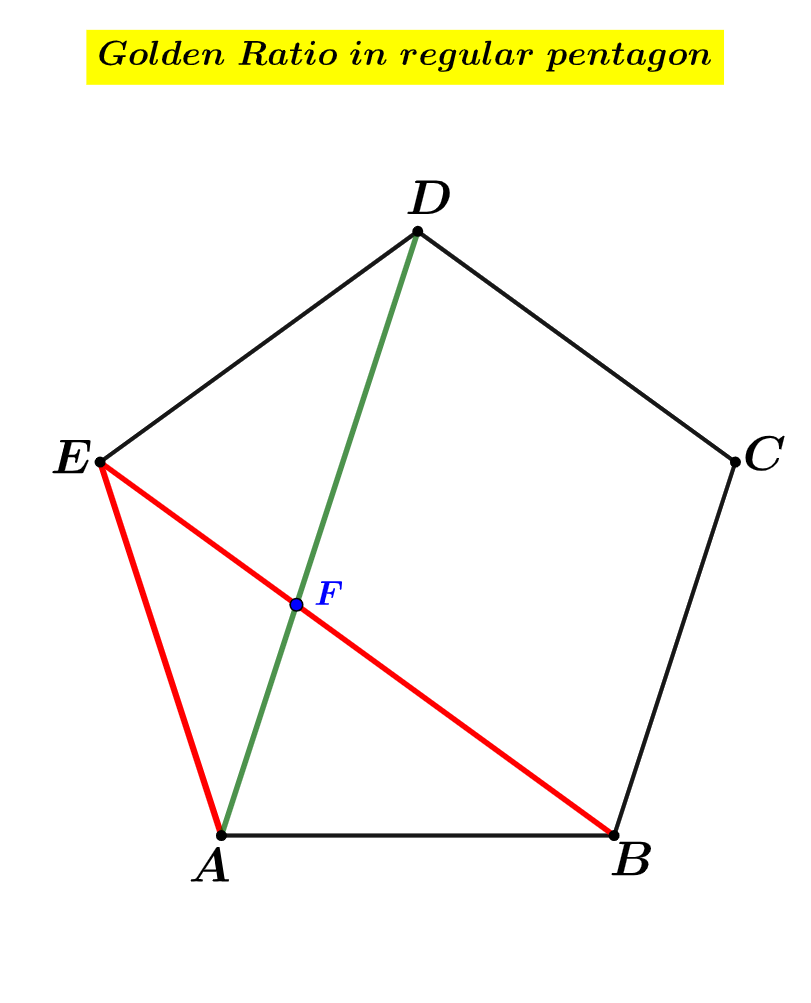
This GeoGebra example demonstrates how to construct and apply the golden ratio in a regular pentagon. Using the Polygon command to draw pentagon ABODE, the Segment command to connect diagonals forming a five-pointed star, and the Intersect command to find intersection points, the precise golden section point F is revealed. The core mathematical concepts include the golden ratio (approximately 0.618), properties of diagonals in regular pentagons, and interior angle theorems. The construction focuses on correctly drawing a regular pentagon and identifying diagonal intersections, which is essential for understanding the geometric meaning of the golden section. This example is suitable for middle school to high school students learning geometric construction of the golden ratio, and for teachers demonstrating applications of golden section in regular polygons.
GeoGebra Commands & Parameters
Polygon(A, B, 5) → wielokąt1, f, g, h, i, j, C, D, ESegment(B, E) → kSegment(A, D) → lIntersect(k, l) → FSegment(D, F) → mSegment(F, A) → n
AI Drawing Prompt Reference
Draw a regular pentagon ABODE, then draw two diagonals to form a five-pointed star, and find their intersection point F to reveal the golden section. First, draw the pentagon, then draw the diagonals, and finally find their intersection.
The prompt above was compiled from the original drawing commands and is for reference only.