
GoGeometry Action 6: Dynamic Geometry and Calculus Integration
Loading the math board and drawing, please wait…
In collections
Circles (Theorems)
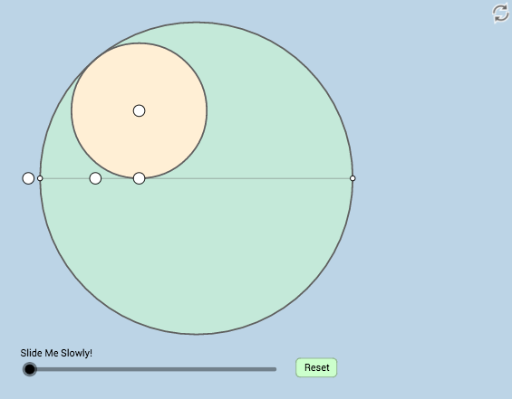
This example is a dynamic and modifiable illustration of a geometry problem posted by Antonino Gutierrez on Twitter, designed to demonstrate the integration of geometric and calculus concepts through interactive construction. The core mathematical concepts involved include circles, geometric mean, differential calculus, planes, continuity, linear regression, and cylinders, showcasing interdisciplinary applications. In terms of construction, the example utilizes a wide range of GeoGebra commands such as Point, Ray, OrthogonalLine, Segment, Circle, Intersect, Line, Dilate, Angle, Rotate, Vector, Translate, Midpoint, CircleArc, and CircleSector, building complex objects including points, lines, circles, arcs, sectors, and transformations, all of which can be dynamically adjusted by users to observe changes. This example is suitable for high school to university-level mathematics instruction, particularly for visualizing geometric constructions, calculus concepts, and mathematical modeling in classroom demonstrations, and can also serve as a reference for teachers designing inquiry-based learning activities.
GeoGebra Commands & Parameters
Point(y = 0) → ARay(A, B) → fPoint(f) → COrthogonalLine(C, p) → qRay(C, F) → iPoint(i) → GRay(G, H) → jPoint(j) → ISegment(I, G) → kCircle(I, G) → cRay(C, D) → hIntersect(l, h) → ERay(E, J) → mIntersect(c, m, 1) → KRay(K, I) → nIntersect(n, y = 0) → LCircle(L, K) → dIntersect(d, y = 0) → M, NSegment(K, N) → rIntersect(c, r, 2) → OLine(O, G) → sIntersect(q, s) → PSegment(K, P) → q_1Segment(K, P) → tSegment(P, O) → aDilate(N, If[0 < b ≤ 1, 1 - b, 0], O) → N'Segment(N, N') → eDilate(O, If[1 < b ≤ 2, 2 - b, 0], K) → O'Segment(O, O') → f_1Dilate(K, If[2 < b ≤ 3, 3 - b, 0], C) → K'Angle(K, C, A) → αSegment(K, K') → g_1Dilate(O, If[3 < b ≤ 4, 4 - b, 0], G) → O'_1Segment(O, O'_1) → h_1Dilate(G, If[4 < b ≤ 5, 5 - b, 0], P) → G'Dilate(C, If[4 < b ≤ 5, 5 - b, 0], P) → C'Segment(G, G') → i_1Segment(C, C') → j_1Segment(M, N) → k_1Circle(G, g_1 + j_1) → c_1Segment(M, G) → l_1Segment(G, Q) → m_1Segment(Q, N) → n_1Dilate(M, If[5 < b ≤ 6, 6 - b, 0], G) → M'Segment(M, M') → p_1Rotate(K, If[6 < b ≤ 7, ((-(b - 6)) * π / 2), ((-π)) / 2], P) → K'_1Rotate(P, If[6 < b ≤ 7, ((-(b - 6)) * π / 2), ((-π)) / 2], P) → P'Segment(K'_1, P') → r_1Dilate(P, If[7 < b ≤ 8, 8 - b, 0], G) → P'_1Vector(P, P'_1) → uTranslate(K'_1, u) → RTranslate(P', u) → P''Segment(R, P'') → s_1Midpoint(M, Q) → SRotate(Q, If[8 < b ≤ 9, ((-(b - 8)) * π), (-π)], S) → Q'CircleArc(S, Q', Q) → d_1OrthogonalLine(G, n_1) → t_1Intersect(d_1, t_1) → T,Angle(T, G, S) → βDilate(T, If[10 < b ≤ 11, 11 - b, 0], G) → T'Segment(T, T') → a_1Dilate(K, If[11 < b ≤ 12, 12 - b, 0], G) → K'_2Segment(K, K'_2) → b_1Angle(T, G, K) → γRotate(K, If[13 < b ≤ 14, ((-(b - 13)) * γ), (-γ)], G) → K'_3Rotate(K'_2, If[13 < b ≤ 14, ((-(b - 13)) * γ), (-γ)], G) → USegment(K'_3, U) → f_2Segment(S, Q') → g_2Segment(M, N) → h_2CircleArc(S, M, Q) → e_1CircleSector(S, Q', Q) → c_2
AI Drawing Prompt Reference
Draw a dynamic geometric figure featuring a circle and a ray. The ray intersects the circle to create a point, from which a perpendicular line is drawn intersecting the ray. This generates a sequence of points and line segments. Build multiple circles, arcs, sectors, and transformations based on these elements, showcasing the integration of geometry and calculus. Include a slider to control parameters, dynamically adjusting the positions and shapes of the elements to illustrate geometric constructions, calculus concepts, and mathematical modeling.
The prompt above was compiled from the original drawing commands and is for reference only.