
GoGeometry Action 172! Dynamic Illustration of Centroid in Isosceles Triangles a
Loading the math board and drawing, please wait…
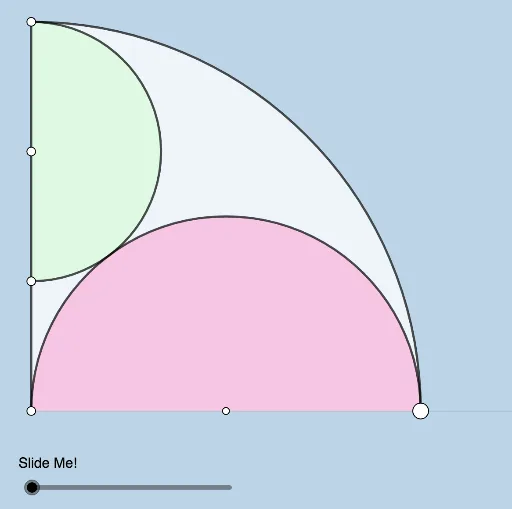
This interactive GeoGebra example presents a dynamic and modifiable illustration of a geometry problem posed by Antonio Gutierrez (GoGeometry Action 172). It demonstrates the relationship between the centroid (or barycenter) of triangles, isosceles triangles, kites, and similar triangles within a composite figure. The core mathematical concepts include the centroid of a triangle, symmetry properties of isosceles triangles, diagonal properties of kites, and proportional reasoning in similar triangles. The construction uses a variety of GeoGebra commands: Point, Semicircle, Circle, Intersect, Midpoint, Segment, OrthogonalLine, Angle, Dilate, Vector, Translate, Rotate, CircleSector, Ray, and CircleArc. These tools create multiple points (A, B, C, D, E, F, G, H, I, J, K, L, etc.), segments, circles, semicircles, angles, vectors, translated/rotated copies, sectors, and arcs. Transformations such as Dilate and Translate generate auxiliary points (G', D', F', etc.) to support the dynamic exploration. This resource is suitable for high school and college students, geometry enthusiasts, and teachers who want to explore centroid properties, similar triangle criteria, and dynamic construction techniques in an interactive environment.
GeoGebra Commands & Parameters
Point(Ray[A, (1, 0)]) → BSemicircle(A, B) → cCircle(A, B) → dIntersect(d, yAxis, 2) → CCircle(C, Distance[A, B] / 3) → eIntersect(e, yAxis, 1) → DMidpoint(A, D) → ESemicircle(C, E) → fIntersect(c, f) → F, , ,Segment(G, F) → gOrthogonalLine(F, g) → hSegment(D, F) → iPoint(h) → HPoint(h) → IAngle(H, F, G) → αAngle(I, F, D) → βDilate(G, If[0 < a ≤ 1, 1 - a, 0], F) → G'Dilate(D, If[0 < a ≤ 1, 1 - a, 0], F) → D'Segment(G, G') → jSegment(D, D') → kPoint(l) → JAngle(J, F, D) → γDilate(F, If[3 < a ≤ 4, 4 - a, 0], A) → F'Vector(F, F') → uTranslate(D, u) → D'_1Translate(D', u) → D''Segment(D'_1, D'') → k'Rotate(D'_1, If[3 < a ≤ 4, ((-(a - 3)) * γ), (-γ)], D'') → KRotate(D'', If[3 < a ≤ 4, ((-(a - 3)) * γ), (-γ)], D'') → D'''Segment(K, D''') → k''CircleSector(A, B, C) → pRotate(K, If[4 < a ≤ 5, ((-(a - 4)) * π), (-π)], K) → K'Rotate(D''', If[4 < a ≤ 5, ((-(a - 4)) * π), (-π)], K) → LSegment(K', L) → k'''Ray(A, B) → mRotate(K', If[5 < a ≤ 6, ((-(a - 5)) * π), (-π)], L) → K''Rotate(L, If[5 < a ≤ 6, ((-(a - 5)) * π), (-π)], L) → L'Segment(K'', L') → nCircleSector(D, E, C) → qMidpoint(A, B) → MCircleSector(M, B, A) → rCircleArc(A, B, C) → sSegment(A, C) → t
AI Drawing Prompt Reference
Draw a dynamic geometric figure starting with a horizontal ray and a point on it. Construct a semicircle with these two points as endpoints, and a circle centered at one point passing through the other. This circle intersects the vertical axis at a point. From that point, draw a smaller circle with radius one-third of the original, intersecting the axis again. Take the midpoint between these two axis points)Skip. Use this midpoint and the axis point to draw another semicircle, intersecting the first semicircle at a point. From this intersection, draw a segment to the ray point, then a perpendicular line to this segment. Place two points on this perpendicular, forming angles with the intersection. Apply scaling and translation to create auxiliary points and segments. Then perform multiple rotations and translations to generate rotated segments and circular sectors, forming a composite figure with triangles, isosceles shapes, and kite-like forms, controlled by a slider.
The prompt above was compiled from the original drawing commands and is for reference only.