
Geostix in GeoGebra A
Loading the math board and drawing, please wait…
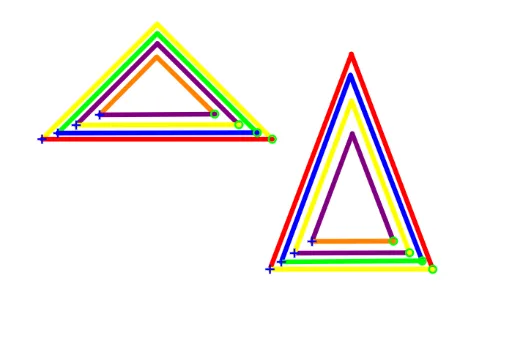
This example demonstrates the construction of a series of triangles and quadrilaterals using line segments akin to Geostix (geometric sticks), with circles and intersection points to build a complex geometric figure. Core mathematical concepts include triangles, quadrilaterals, angles, area, congruence, and the tangent function, along with fundamental geometric construction methods. Construction highlights: from the summary, commands such as Circle, Point, Intersect, and Segment are used, creating multiple points (A through L), circles (c, c_1), and segments (a, b, d, etc.), with vertices determined by intersections to progressively form several triangles and trapezoids. Suitable for middle and high school geometry instruction, helping students understand geometric constructions, properties of shapes, congruence and area relationships, and also useful for exploring advanced topics like the tangent function.
GeoGebra Commands & Parameters
Circle(A, pu) → cPoint(c) → BCircle(A, ye) → dCircle(B, ye) → eIntersect(d, e, 1) → CSegment(A, B) → aSegment(C, A) → bSegment(C, B) → fCircle(D, ye) → gPoint(g) → ECircle(D, pu) → hCircle(E, pu) → kIntersect(h, k, 1) → FSegment(D, F) → iSegment(F, E) → jSegment(D, E) → lCircle(G, pu) → pPoint(p) → HCircle(G, or) → qCircle(H, or) → rIntersect(q, r, 1) → ISegment(G, I) → mSegment(I, H) → nSegment(G, H) → sCircle(J, bl) → tPoint(t) → KCircle(J, gr) → c_1Circle(K, gr) → d_1Intersect(c_1, d_1, 1) → LSegment(J, L) → a_1Segment(L, K) → b_1Segment(K, J) → e_1Circle(M, re) → f_1Point(f_1) → NCircle(M, ye) → g_1Circle(N, ye) → h_1Intersect(g_1, h_1, 1) → OSegment(M, O) → i_1Segment(O, N) → j_1Segment(M, N) → k_1Circle(P, or) → p_1Point(p_1) → QCircle(P, pu) → q_1Circle(Q, pu) → r_1Intersect(q_1, r_1, 1) → RSegment(P, R) → l_1Segment(R, Q) → m_1Segment(Q, P) → n_1Circle(S, gr) → s_1Point(s_1) → TCircle(S, bl) → t_1Circle(T, bl) → c_2Intersect(t_1, c_2, 1) → USegment(S, U) → a_2Segment(T, U) → b_2Segment(S, T) → d_2Circle(V, ye) → e_2Point(e_2) → WCircle(V, re) → f_2Circle(W, re) → g_2Intersect(f_2, g_2, 1) → ZSegment(V, Z) → h_2Segment(Z, W) → i_2Segment(W, V) → j_2
AI Drawing Prompt Reference
Construct a series of triangles and quadrilaterals using geometric sticks. Start with a circle, pick a point on it, then draw another circle of equal radius centered at that point; the intersection and centers form an equilateral triangle. Repeat this pattern, alternately using different radii (equal or double), drawing circles centered at new points, taking intersections, and connecting them with segments to progressively form multiple triangles and trapezoids. The final figure is a complex arrangement of congruent and similar triangles, useful for exploring angles, area, and congruence.
The prompt above was compiled from the original drawing commands and is for reference only.