
Geometry Resources
Loading the math board and drawing, please wait…
In collections
CCSS High School: Geometry (Circle equations)
CCSS High School: Geometric Properties of Parabola
CCSS High School: Geometry Circle Equations
This collection includes over 1000 interactive geometry resources. It demonstrates various geometric shapes and phenomena, such as triangles, circles, polygons, etc. Using GeoGebra commands like Segment, Polygon, Circle, etc., you can perform geometric constructions. Suitable for students and teachers at the middle school level and above.
GeoGebra Commands & Parameters
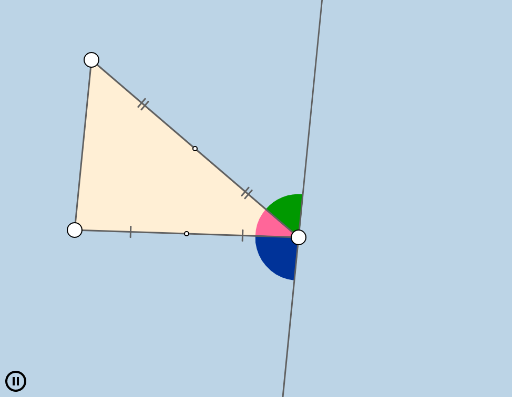
Segment(B, C) → eSegment(C, A) → fMin(f, e) → mSegment(A, B) → dMin(d, f) → oMin(m, o) → uPolygon(A, B, C) → poly1, c, a, bRay(A, B) → hRay(B, C) → iRay(C, A) → jCircle(C, (0.25 * u)) → pCircle(A, (0.25 * u)) → qCircle(B, (0.25 * u)) → rIntersect(p, f) → D,Intersect(p, e, 1) → EIntersect(r, e, 1) → FIntersect(r, d, 1) → GIntersect(q, d, 1) → HIntersect(q, f, 1) → IIntersect(r, h, 2) → JIntersect(q, j, 2) → KIntersect(p, i, 2) → LMidpoint(f) → MMidpoint(e) → NCircleSector(A, H, I) → sCircleSector(B, F, G) → tCircleSector(C, D, E) → c_1Angle(A, C, B) → αCircleSector(C, E, D) → d_1CircleSector(A, I, H) → e_1CircleSector(B, G, F) → f_1Min(d, e) → nRotate(s, If[0 < l ≤ 1, (((-l) * 180))°, (-(180°))], M) → s'Rotate(A, If[0 < l ≤ 1, (((-l) * 180))°, (-(180°))], M) → A'Segment(M, A') → a_1Rotate(H, (-(180°)), M) → H'Line(H', C) → b_1Rotate(B, If[0 < l ≤ 1, ((l * 180))°, 180°], N) → B'Rotate(t, If[0 < l ≤ 1, ((l * 180))°, 180°], N) → t'Segment(N, B') → g_1Segment(C, M) → h_1Segment(M, A) → i_1Segment(C, N) → j_1Segment(N, B) → k_1Rotate(A, If[0 < l ≤ 1, ((l * 180))°, (-(180°))], M) → A'_1Rotate(B, If[0 < l ≤ 1, (((-l) * 180))°, (-(180°))], N) → B'_1Segment(N, B'_1) → l_1Segment(M, A'_1) → m_1Rotate(e_1, If[0 < l ≤ 1, ((l * 180))°, (-(180°))], M) → p_1Rotate(f_1, If[0 < l ≤ 1, (((-l) * 180))°, (-(180°))], N) → q_1CircleSector(C, L, D) → r_1CircleSector(A, K, H) → s_1CircleSector(B, J, F) → t_1CircleSector(A, H, K) → c_2CircleSector(B, F, J) → d_2CircleSector(C, D, L) → e_2Dilate(A, 1 - v, C) → A'_2Dilate(B, 1 - v, C) → B'_2Vector(A, A'_2) → wVector(B, B'_2) → u_1Translate(s_1, w) → f_2CircleArc(A, K, H) → g_2Translate(t_1, u_1) → h_2CircleArc(B, J, F) → k_2Translate(c_2, w) → p_2CircleArc(A, H, K) → q_2Translate(d_2, u_1) → r_2CircleArc(B, F, J) → s_2
AI Drawing Prompt Reference
Draw a triangle with vertices and sides. Mark the midpoint of each side. From each vertex, draw a circle with radius equal to one quarter of the shortest side length. These circles intersect the triangle's sides at six points. Connect these points to form three circular sectors at the vertices. Then, using the midpoints of the sides as rotation centers, rotate the corresponding sectors and vertices by an angle that varies from 0 to 180 degrees based on a parameter. Draw segments connecting the rotated vertices to the midpoints, along with additional auxiliary lines, to create a dynamic geometric construction.
The prompt above was compiled from the original drawing commands and is for reference only.