
Geometric Visualization of Polar Multiplication of Complex Numbers
Loading the math board and drawing, please wait…
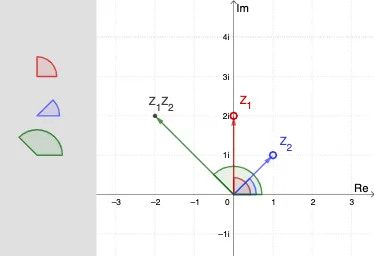
This example demonstrates the polar rule for multiplying complex numbers: when two complex numbers are multiplied, their magnitudes (moduli) multiply while their arguments (angles) add. The construction visualizes each complex number as an origin-based vector, showing how the resulting product vector corresponds to the geometric combination of direction and scale. The key mathematical ideas include complex numbers in polar form, vector representation in the complex plane, argument (phase) measurement, and the angle-addition behavior underlying complex multiplication. In GeoGebra, vectors such as v_1, v_2 and the product vector W are created with Vector; directions and argument relationships are handled with Angle (ϕ_1, ϕ_2, and derived angles like ϕ_3). Conditional logic via If is used to manage choices or visibility of construction steps, Translate helps place translated geometric elements to form consistent visual relationships, and Polygon (e.g., poly1) is used to build comparison/illustration shapes. The interactive point/angle objects (Z_1, Z_2, PZ1, PZ2, PW, and argument markers like Pϕ_1/Pϕ_2/Pϕ_3) support observing how changing the inputs updates the product geometry. Suitable for high school through early undergraduate learners, especially for lessons on complex numbers and geometric interpretations of algebraic rules.
GeoGebra Commands & Parameters
Vector((0, 0), Z_1) → v_1Vector((0, 0), Z_2) → v_2Angle((100, 0), (0, 0), Z_1) → ϕ_1Angle((100, 0), (0, 0), Z_2) → ϕ_2Vector((0, 0), W) → wIf(0 ≤ t ≤ 1, (yp3, (3 * (1 - t)) + (t * y(P3))), P3) → P1Angle((100, 0), (0, 0), W) → ϕ_3If(0 ≤ t ≤ 1, (yp3, 2), If[1 < t ≤ 2, (yp3, (2 * (1 - (t - 1))) + ((t - 1) * y(P3))), P3]) → P2Translate(Z_1, Vector[(0, 0), P1]) → PZ1Translate(Z_2, Vector[(0, 0), P2]) → PZ2Translate(W, Vector[(0, 0), P3]) → PWAngle((x(P1) + 100, y(P1)), P1, PZ1) → Pϕ_1Angle((x(P2) + 100, y(P2)), P2, PZ2) → Pϕ_2Angle((x(P3) + 100, y(P3)), P3, PW) → Pϕ_3If(0 ≤ t ≤ 2, PZ2, Rotate[PZ2, (Pϕ_1 * (t - 2)), P2]) → RPZ2If(0 ≤ t ≤ 2, (x(P2) + 100, y(P2)), Rotate[(x(P2) + 100, y(P2)), (Pϕ_1 * (t - 2)), P2]) → ROZ2Angle(ROZ2, P2, RPZ2) → RPϕ_2Polygon(A1, A2, A3, A4) → poly1, a1, a2, a3, a4
AI Drawing Prompt Reference
Visualize the multiplication of two complex numbers in the complex plane by drawing their corresponding vectors. Show that the magnitude of the product vector is the product of the magnitudes of the two vectors, and its direction is the sum of their angles. Observe how the product vector changes as the input vectors are adjusted dynamically, using auxiliary shapes and angle markers to highlight the relationships between directions and angles.
The prompt above was compiled from the original drawing commands and is for reference only.