
Geometric Visualization of Integer Subtraction
Loading the math board and drawing, please wait…
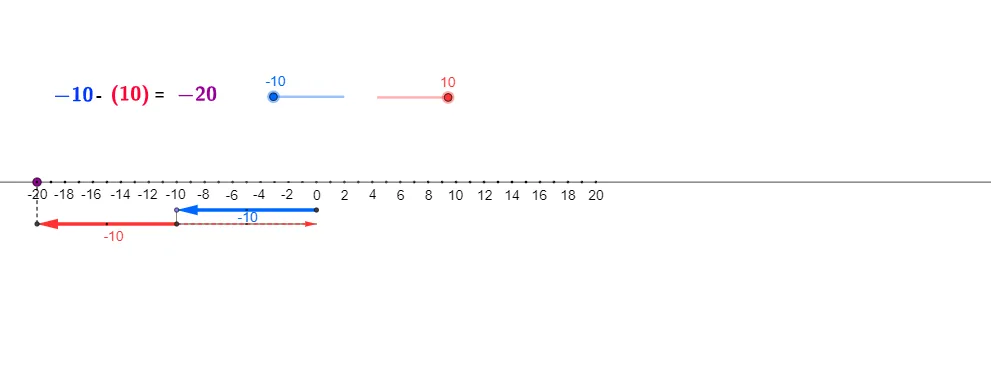
This GeoGebra example demonstrates the process of subtracting integers using geometric representations. The core mathematical concepts involved include integer subtraction, geometric modeling, vector operations, and coordinate geometry. Key construction elements: it employs GeoGebra commands such as Line, Point, Circle, OrthogonalLine, Intersect, Vector, Translate, Mirror, Segment, and Midpoint, along with objects like points A, B, C, etc., to create visual models that represent integer positions and subtraction actions. Suitable for middle school or upper elementary students, it serves as an educational tool to grasp the geometric interpretation of integer operations.
GeoGebra Commands & Parameters
Line(A, B) → aPoint(a) → CCircle(C, 4) → kOrthogonalLine(C, a) → dIntersect(k, d, 2) → R_1Intersect(k, d, 1) → J_1Circle(C, 2) → pIntersect(p, d) → I_1, L_5Circle(L_5, 1) → gIntersect(g, d, 1) → N_1Circle(R_1, N_1) → rIntersect(r, d, 2) → S_1OrthogonalLine(N_1, d) → iCircle(M_1, 1) → qIntersect(q, i) → O_1, P_1Vector(I_1, L_1) → vTranslate(O_1, v) → Q_1Mirror(Q_1, O_1) → Z_1Point(a) → DPoint(a) → EPoint(a) → FPoint(a) → GPoint(a) → HPoint(a) → IPoint(a) → JPoint(a) → KPoint(a) → LPoint(a) → MPoint(a) → NPoint(a) → OPoint(a) → PPoint(a) → QPoint(a) → RPoint(a) → SPoint(a) → TPoint(a) → UPoint(a) → VPoint(a) → WPoint(a) → YPoint(a) → ZPoint(a) → A_1Point(a) → B_1Point(a) → C_1Point(a) → D_1Point(a) → E_1Point(a) → F_1Point(a) → G_1Point(a) → H_1OrthogonalLine(I_1, d) → eOrthogonalLine(L_5, d) → hOrthogonalLine(J_1, d) → fVector(J_1, K_1) → uVector(L_5, M_1) → wVector(O_1, Q_1) → zOrthogonalLine(S_1, d) → jVector(S_1, T_1) → lSegment(J_1, S_1) → mSegment(M_1, O_1) → tOrthogonalLine(K_1, a) → nIntersect(n, a) → U_1OrthogonalLine(L_1, a) → sOrthogonalLine(T_1, a) → a_1Intersect(s, a) → W_1Intersect(a_1, a) → Y_1Segment(K_1, U_1) → b_1Segment(T_1, Y_1) → c_1Segment(L_1, W_1) → d_1Segment(I_1, L_1) → b_2Segment(J_1, K_1) → e_1Segment(L_5, M_1) → f_1Segment(Q_1, O_1) → g_1Segment(T_1, S_1) → h_1Midpoint(J_1, K_1) → Z_2Midpoint(I_1, L_1) → A_2Midpoint(L_5, M_1) → B_2Midpoint(Q_1, O_1) → C_2Mirror(O_1, O_1) → O_1'Segment(Z_1, O_1') → i_1Vector(O_1, Z_1) → u_1Segment(O_1, Z_1) → j_1Midpoint(O_1, Z_1) → V_1Segment(Z_1, Y_1) → k_1Point(a) → D_2Point(a) → E_2Point(a) → F_2Point(a) → G_2Point(a) → H_2Point(a) → I_2Point(a) → J_2Point(a) → K_2Point(a) → L_2Point(a) → M_2
AI Drawing Prompt Reference
Draw a horizontal line with two base points marked on it, and place many arbitrary points along the line to represent integer positions. From one central point, construct a large circle of radius four, and draw a perpendicular line through this point intersecting the large circle at two points. From the same center, draw a smaller circle of radius two, intersecting the perpendicular line at two points. Take one of these intersection points as a center to draw a unit circle, which meets the perpendicular line at another point. Then, using the upper intersection of the large circle as a center, draw a circle passing through that unit-circle intersection, meeting the perpendicular line at a new point. Next, draw a line perpendicular to the original perpendicular through the unit-circle intersection, and place a unit circle centered at some point to intersect this new line at two points. Finally, define a vector between two reference points, translate one of the intersection points by this vector, and reflect the translated point about the original point to complete the geometric visualization of integer subtraction.
The prompt above was compiled from the original drawing commands and is for reference only.