
Geometric Vector Modeling of Linear Acceleration
Loading the math board and drawing, please wait…
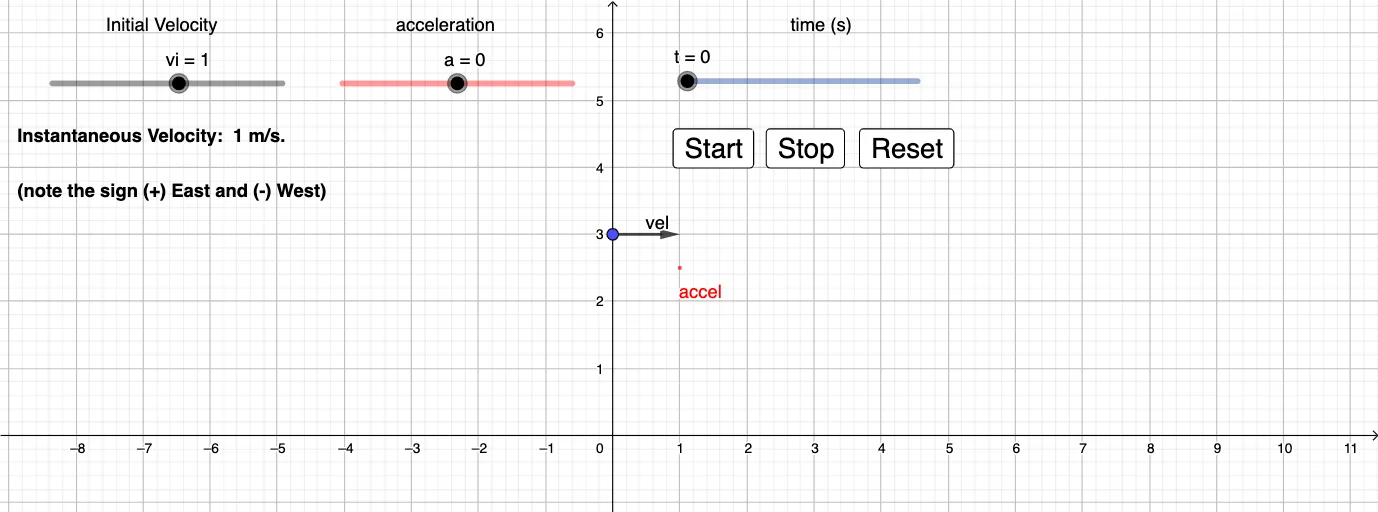
This example demonstrates how linear acceleration can be visualized through a geometric, vector-based relationship between displacement and velocity changes. Instead of treating acceleration purely algebraically, the construction uses vector magnitudes and measured distances so that acceleration-related quantities (e.g., accel, a, t) appear as measurable geometric features. Key mathematical concepts include vectors (displacement/velocity as vectors), distance-based magnitude representation (using lengths of vectors or point-to-axis distances), and the underlying linear relationship connecting acceleration, velocity change, and displacement over time. Construction-wise, it leverages the GeoGebra commands shown in the summary—“Distance, Vector”—to compute and display distances and vector lengths for objects such as vi, vel, velvec, accel, and measured quantities like distanceAyAxis and distanceAB. It also defines reference points (A, B, C, D, …) that anchor the geometric representation of the motion quantities. Suitable for secondary science/math instruction and early university STEM courses focused on vector modeling, visualization of kinematics ideas, and interactive geometry construction.
GeoGebra Commands & Parameters
Distance(A, yAxis) → distanceAyAxisVector(A, B) → velDistance(A, B) → distanceABVector(C, D) → wVector(E, F) → bVector(G, H) → accel
AI Drawing Prompt Reference
Create a geometric vector model to visualize linear acceleration. Start by setting up the coordinate axis, then define the distance from point A to the y-axis to represent displacement. Use a vector to represent velocity and calculate its length. Define point B and calculate the distance from A to B to represent velocity change. Define point C and D, use a vector to represent w, define point E and F, use a vector to represent b, and finally define point G and H, use a vector to represent acceleration.
The prompt above was compiled from the original drawing commands and is for reference only.