
2D Vector Directions: Visualizing x- and y-Components
Loading the math board and drawing, please wait…
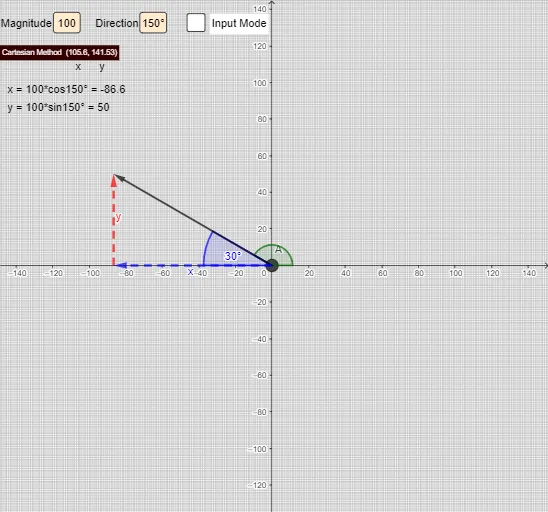
This example demonstrates how a 2D vector’s direction determines its x- and y-components by building an interactive geometry setup. Students can visually connect the vector with a direction angle (e.g., α, β, γ, δ) and see how the projections onto the coordinate axes produce the component values. Key ideas include vectors in two dimensions, vector decomposition into coordinate components, and angle-based relationships underlying trigonometry (Angle, sine/projection interpretation). Construction highlights: it uses GeoGebra commands such as Intersect, Vector, Point, Angle, Midpoint, and Rotate to create the vector endpoints, angle markers, and auxiliary geometry. Direction references like East/West/North/South and component objects (e.g., ycomponent and derived vectors like v1) are combined with PolarPositive quadrant/angle handling, while Textfield is used to display computed angle and component values. Suitable for high-school physics/math (e.g., Physics 20) and for classroom instruction, worksheets, and exploratory learning about vector components and trigonometric projection.
GeoGebra Commands & Parameters
Intersect(xAxis, yAxis) → AVector(A, v) → v_{1}Point(xAxis) → CAngle(C, A, v) → αPoint(yAxis) → EPoint(xAxis) → FPoint(yAxis) → GAngle(C, A, v) → βAngle(v, A, F) → εAngle(F, A, v) → ζAngle(v, A, C) → ιVector(A, B) → uVector(B, v) → ycomponentMidpoint(B, D) → HMidpoint(v, B) → IRotate(J, γ, D) → J'Angle(J, D, J') → δTextfield(Mag) → InputBox1Textfield(γ) → InputBox2Vector(D, J') → wVector(A, K) → cVector(K, J') → dAngle(J', A, K) → ηAngle(K, A, J') → θ
AI Drawing Prompt Reference
Draw a 2D vector decomposition diagram. Start with a coordinate origin and draw a vector pointing into the first quadrant, labeling its direction angle. From the vector's tip, draw perpendicular projections to the x-axis and y-axis, creating two component vectors, and connect them with dashed auxiliary lines. At the origin, mark the angle between the vector and the positive x-axis with an arc, and also indicate other related angles. Place points on the x-axis and y-axis to help construct angle markers. Near the vector's tip, add two input boxes to display the vector's magnitude and angle value. The overall figure should clearly show the vector, its components, angle markers, and auxiliary geometric elements.
The prompt above was compiled from the original drawing commands and is for reference only.