
Geometric Translation: Polygon and Vector Transformation
Loading the math board and drawing, please wait…
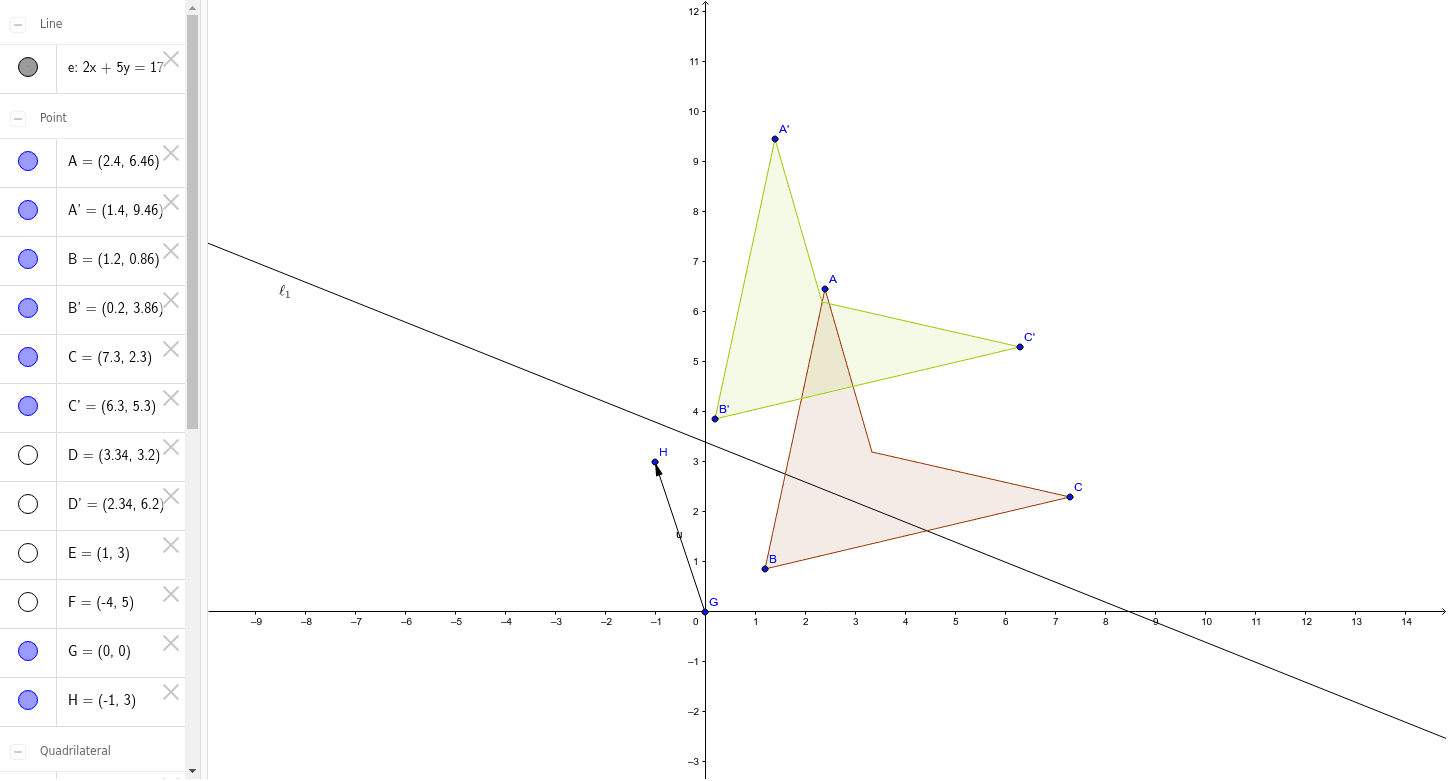
This example demonstrates the translation transformation of a polygon under the influence of a vector. Core concepts include geometric translation, vector representation, and coordinate changes. Construction involves using the Polygon command to build the initial shape, Line to define edges, Vector to represent displacement, and Translate to generate corresponding points and the new figure. Suitable for middle or high school geometry teaching to help students intuitively understand translation properties and their impact on area and shape.
GeoGebra Commands & Parameters
Polygon(A, B, C, D) → poly1, a, b, c, dLine(F, E) → eVector(G, H) → uTranslate(A, u) → A'Translate(B, u) → B'Translate(C, u) → C'Translate(D, u) → D'Polygon(A', B', C', D') → poly1', a', b', c', d'
AI Drawing Prompt Reference
Draw an arbitrary quadrilateral with its four sides, then add a straight line and a vector indicating a translation direction and magnitude. Use the vector to translate each vertex of the quadrilateral, connecting the translated vertices to form a second quadrilateral that is congruent to the first. The figure shows the original shape, the translation vector, the auxiliary line, and the translated copy, illustrating how translation preserves size and shape while changing position.
The prompt above was compiled from the original drawing commands and is for reference only.