
Geometric Transformation: Rotation of Polygons and Triangles
Loading the math board and drawing, please wait…
In collections
Rotation Exploration
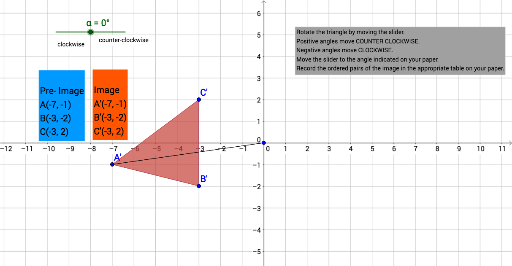
This GeoGebra example demonstrates the geometric rotation of polygons, specifically showing how triangles and other polygons transform when rotated around a fixed center by a given angle. Core mathematical concepts include geometric transformations, rotational symmetry, congruence, invariant points, and the parameters of rotation (center and angle). To construct this, the example utilizes key GeoGebra commands such as Polygon to define the initial shape with vertices A, B, C, Segment and Angle to establish the geometric framework, and the powerful Rotate command to map the original polygon poly1 and its vertices to their images A', B', C' and poly1' based on rotation angles alpha and beta. Text objects are used to annotate the geometric properties. It is highly suitable for secondary school geometry classes, transformation geometry lectures, and interactive student exercises to visualize the properties of rigid motions.
GeoGebra Commands & Parameters
Polygon(A, B, C) → poly1, c, a, bRotate(A, α, D) → A'Rotate(B, α, D) → B'Rotate(C, α, D) → C'Polygon(A', B', C') → poly1', c', a', b'Segment(A, D) → fSegment(D, A') → gAngle(A, D, A') → β
AI Drawing Prompt Reference
Draw a triangle rotated around a fixed center. The initial triangle has vertices A, B, and C. The rotation center is point D, and the rotation angle is alpha. After rotation, the vertices become A', B', and C', forming a new triangle. The figure includes the original triangle and the rotated triangle, along with the rotation center D. The construction order is to draw the initial triangle, determine the rotation center and angle, rotate the vertices, and then draw the rotated triangle.
The prompt above was compiled from the original drawing commands and is for reference only.