
Geometric Rotational Symmetry Construction
Loading the math board and drawing, please wait…
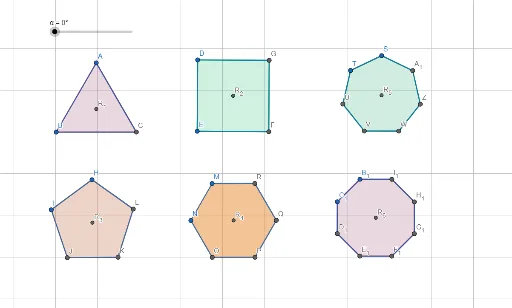
This GeoGebra example demonstrates how to construct geometric figures with rotational symmetry. Using polygons as the main example, it illustrates how a shape coincides with itself after rotating around a center point by a specific angle. The core mathematical concepts include the definition of rotational symmetry, calculation of rotation angles, and identification of the center of rotation. Construction key points: Use the Polygon command to create polygons (poly1, poly2, poly3), apply the Rotate command to perform rotations (R_1, R_2), utilize LineBisector to draw angle bisectors for determining the rotation center, and employ OrthogonalLine and Intersect commands for precise geometric construction. Suitable for middle school geometry transformation lessons and understanding rotational symmetry applications in design.
GeoGebra Commands & Parameters
Polygon(A, B, 3) → poly1, f, g, h, COrthogonalLine(A, g) → iOrthogonalLine(C, f) → jOrthogonalLine(B, h) → kIntersect(i, j) → R_1Rotate(poly1, α, R_1) → poly1'Polygon(D, E, 4) → poly2, l, m, n, p, F, GLineBisector(p) → qLineBisector(n) → rIntersect(q, r) → R_2Rotate(poly2, α, R_2) → poly2'Polygon(H, I, 5) → poly3, s, t, a, b, c, J, K, LOrthogonalLine(K, s) → dOrthogonalLine(H, a) → eOrthogonalLine(J, c) → f_1OrthogonalLine(L, t) → g_1OrthogonalLine(I, b) → h_1Intersect(d, e) → R_3Rotate(poly3, α, R_3) → poly3'Polygon(M, N, 6) → poly4, i_1, R, j_1, k_1, l_1, m_1, n_1, O, P, QLineBisector(n_1) → p_1LineBisector(m_1) → q_1LineBisector(l_1) → r_1Intersect(p_1, q_1) → R_4Rotate(poly4, α, R_4) → poly4'Polygon(S, T, 7) → poly5, s_1, W, Z, A_1, t_1, a_1, b_1, c_1, d_1, e_1, U, VOrthogonalLine(S, b_1) → f_2OrthogonalLine(W, s_1) → g_2OrthogonalLine(A_1, a_1) → h_2OrthogonalLine(Z, t_1) → i_2Intersect(f_2, g_2) → R_5Rotate(poly5, α, R_5) → poly5'Polygon(B_1, C_1, 8) → poly6, j_2, E_1, F_1, G_1, H_1, I_1, k_2, l_2, m_2, n_2, p_2, q_2, r_2, D_1LineBisector(r_2) → s_2LineBisector(p_2) → t_2LineBisector(q_2) → a_2Intersect(s_2, t_2) → R_6Rotate(poly6, α, R_6) → poly6'
AI Drawing Prompt Reference
Draw a set of regular polygons — triangle, square, pentagon, hexagon, heptagon, and octagon — by first locating each polygon’s rotation center using intersecting perpendicular bisectors for odd‑sided figures and angle bisectors for even‑sided ones, then rotate every polygon around its own center by the same angle α to illustrate rotational symmetry. The construction shows how each shape coincides with itself after rotation, highlighting the relationship between the number of sides and the rotation angle.
The prompt above was compiled from the original drawing commands and is for reference only.