
Geometric Puzzle: Chain Construction with Polygons and Circles
Loading the math board and drawing, please wait…
In collections
ગણિત ની પઝલ્સ
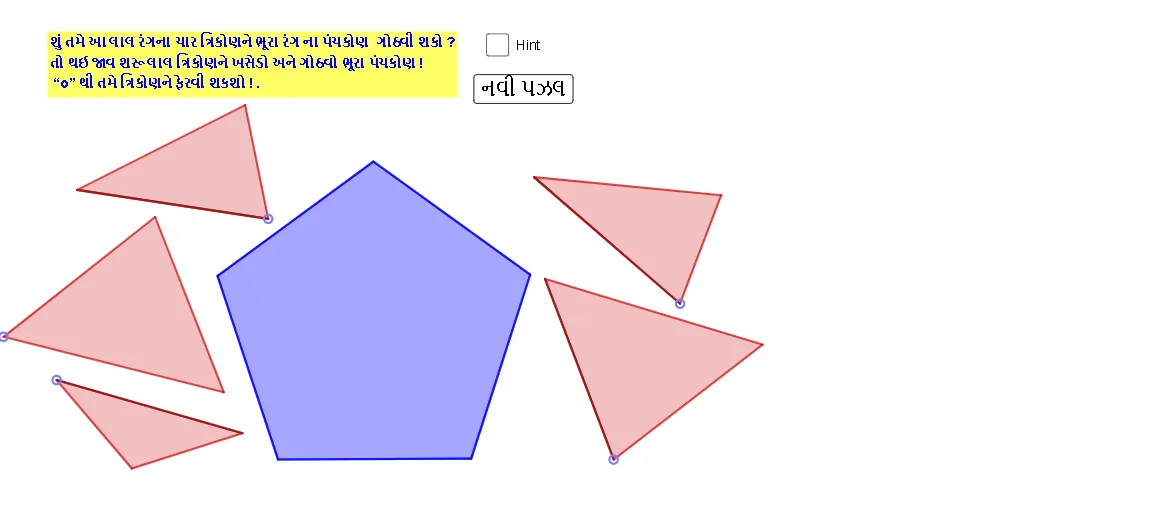
This example demonstrates a step-by-step geometric “puzzle” in which polygon vertices, intersection points, and a circle work together to produce a chained, constrained configuration. The key ideas include polygon structure, circle–line intersection, midpoint properties, and parameterized (variable-driven) construction that lets the arrangement evolve while preserving the puzzle rules. Construction highlights from the provided GeoGebra command set: Polygon to build the initial polygon framework; Midpoint to impose structural constraints; Line and Segment to create connecting lines/segments; Intersect to compute the crucial locking/intersection points; PointIn to select points that satisfy containment/placement conditions; Point to create nodes; and Circle to introduce a circular constraint. The named objects (e.g., A, B, C, t1, c, etc.) serve as intermediate quantities linking each construction step. Suitable for middle/high school geometry activities, exploratory learning, and classrooms focused on geometric construction methods and dependency between elements.
GeoGebra Commands & Parameters
Polygon(A, B, C) → t1, c, a_{3}, bMidpoint(a_{3}) → DMidpoint(b) → EMidpoint(c) → FLine(C, F) → fLine(A, D) → gLine(B, E) → hIntersect(f, g) → GPointIn(t1) → Pointt1Point(Circle[H, Distance[B, G]]) → ISegment(H, I) → iCircle(H, Distance[B, F]) → eCircle(I, Distance[G, F]) → kIntersect(e, k, 1) → JPolygon(H, J, I) → t2, i_1, h_1, jPoint(Circle[K, Distance[B, D]]) → LSegment(K, L) → lCircle(K, Distance[B, G]) → pCircle(L, Distance[G, D]) → qIntersect(p, q, 1) → MPolygon(K, M, L) → t3, l_1, k_1, mPoint(Circle[N, Distance[D, C]]) → OSegment(N, O) → nCircle(N, Distance[G, D]) → rCircle(O, Distance[G, C]) → sIntersect(r, s, 1) → PPolygon(N, P, O) → t4, o, n_1, p_1Point(Circle[Q, Distance[C, F]]) → RSegment(Q, R) → tCircle(Q, Distance[F, A]) → c_1Circle(R, Distance[C, A]) → d_1Intersect(c_1, d_1, 1) → TPolygon(T, Q, R) → t5, r_1, t_1, q_1Polygon(S, U, 5) → poly1, f_1, g_1, j_1, m_1, s_1, V, W, ZSegment(W, U) → a_1Segment(S, V) → b_1Intersect(a_1, b_1) → A_1Segment(Z, A_1) → e_1Point(Circle[C_1, Distance[Z, S]]) → D_1Segment(C_1, D_1) → f_2Circle(C_1, e_1) → c_2Circle(D_1, 4.44) → d_2Intersect(c_2, d_2, 1) → F_1Polygon(C_1, F_1, D_1) → t6, g_2, h_2, i_2Point(Circle[B_1, Distance[Z, W]]) → H_1Segment(B_1, H_1) → j_2Circle(B_1, 4.44) → e_2Circle(H_1, e_1) → k_2Intersect(e_2, k_2, 1) → E_1Polygon(B_1, E_1, H_1) → t7, l_2, m_2, n_2Point(Circle[G_1, Distance[W, V]]) → I_1Segment(G_1, I_1) → p_2Circle(G_1, 4.44) → q_2Circle(I_1, 2.74) → r_2Intersect(q_2, r_2, 1) → J_1Polygon(G_1, J_1, I_1) → t8, s_2, t_2, a_2Point(Circle[K_1, Distance[U, V]]) → L_1Segment(K_1, L_1) → b_2Circle(K_1, 2.74) → c_3Circle(L_1, 2.74) → d_3Intersect(c_3, d_3, 1) → M_1Polygon(K_1, M_1, L_1) → t9, f_3, g_3, h_3Point(Circle[N_1, Distance[S, U]]) → O_1Segment(N_1, O_1) → i_3Circle(N_1, 4.44) → e_3Circle(O_1, 2.74) → k_3Intersect(e_3, k_3, 1) → P_1Polygon(N_1, P_1, O_1) → t10, o_1, j_3, l_3Segment(C, F) → n_3Segment(G, B) → dSegment(D, G) → m_3
AI Drawing Prompt Reference
Draw a chain of triangles and a pentagon interconnected by circles and intersection points. Start with a base triangle, mark midpoints of its sides, and draw lines from each vertex to the opposite midpoint; these medians meet at a common point. Place a point inside the triangle, use it as a center for a circle, and pick a point on the circle to form a new triangle linked to the first via intersections. Repeat this process: for each new triangle, construct circles centered at its vertices, find their intersection, and build the next triangle. Finally, add a pentagon, connect some of its vertices with segments, and use circle intersections to create additional triangles, resulting in a nested, chain-like geometric composition.
The prompt above was compiled from the original drawing commands and is for reference only.