
Geometry Puzzle: Rearranging figures with circles, midpoints, and orthogonal con
Loading the math board and drawing, please wait…
In collections
ગણિત ની પઝલ્સ
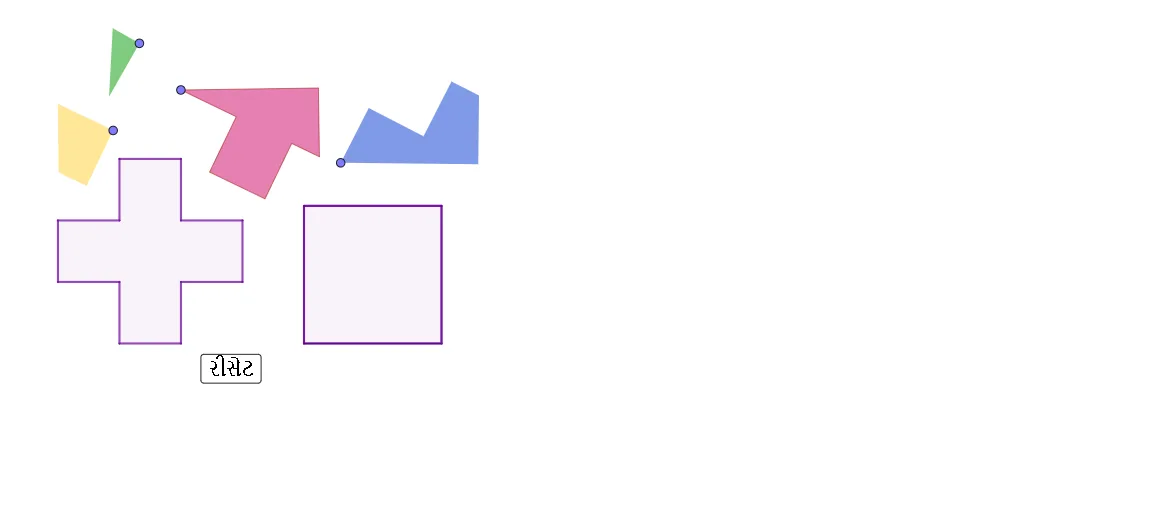
This example demonstrates how to rearrange or position given geometric figures so that the resulting configuration satisfies specified geometric constraints. Key math ideas include circle-based constraints (e.g., circumscribed circle/circle geometry), orthogonal (perpendicular) line constructions, midpoint-driven segment relations, and defining polygon vertices through intersection points to achieve a consistent final shape. In GeoGebra, the construction uses Point to place key vertices (objects like A, B, C, D, and others), Segment to form necessary edges, Circle to generate auxiliary circles (e.g., r and several circle objects), OrthogonalLine to impose perpendicular constraints, and Intersect to compute precise new points from line/circle intersections. Finally, Polygon is used to build the target shapes (e.g., poly1) and check the assembled configuration. Suitable for middle/high school geometry, especially lessons on geometric constructions with circles and perpendiculars, as well as contest-style puzzle solving.
GeoGebra Commands & Parameters
Point(Circle[A, r]) → BSegment(A, B) → fCircle(A, r) → cCircle(A, (2 * r)) → dCircle(A, (3 * r)) → eOrthogonalLine(A, f) → gIntersect(c, g, 2) → CIntersect(d, g, 2) → DIntersect(e, g, 2) → EOrthogonalLine(C, g) → hOrthogonalLine(D, g) → iOrthogonalLine(E, g) → jCircle(C, r) → kCircle(C, (2 * r)) → pIntersect(k, h, 2) → FIntersect(k, h, 1) → IIntersect(p, h, 1) → JOrthogonalLine(F, h) → lOrthogonalLine(I, h) → mOrthogonalLine(J, h) → nIntersect(n, i) → GIntersect(j, m) → HIntersect(i, m) → KIntersect(i, l) → LPolygon(A, C, I, B, F, L, D, E, H, K, G, J) → poly1, a, j_1, i_1, b, c_1, f_1, l_1, d_1, e_1, h_1, k_1, g_1Segment(C, G) → qOrthogonalLine(C, q) → sIntersect(s, l_1) → MIntersect(s, f) → NPolygon(M, C, G, K, H, E, D) → poly2, m_1, c_2, g_2, k_2, h_2, e_2, d_2Polygon(N, C, G, J, I, B) → poly3, n_1, c_3, g_3, j_2, i_2, b_1Polygon(C, A, N) → poly4, n_2, c_4, a_1Polygon(L, F, C, M) → poly5, l_2, f_2, c_5, m_2Point(Circle[P, q]) → QSegment(P, Q) → tOrthogonalLine(P, t) → p_1Circle(P, m_1) → q_1Intersect(q_1, p_1, 2) → RSegment(R, P) → r_1Segment(R, Q) → s_1OrthogonalLine(P, s_1) → t_1Intersect(t_1, s_1) → SCircle(S, r) → p_2Intersect(p_2, s_1, 1) → TPolygon(S, T, 4) → poly6, q_2, r_2, s_2, t_2, U, VPolygon(P, R, S, V, U, T, Q) → poly7, p_3, r_3, s_3, v, u, t_3, q_3Circle(W, c_3) → d_3Point(d_3) → ZSegment(W, Z) → a_2OrthogonalLine(W, a_2) → b_2Circle(W, n_1) → e_3Intersect(e_3, b_2, 1) → A_1Segment(W, A_1) → f_3Midpoint(a_2) → B_1Circle(B_1, W) → h_3Circle(W, (2 * r)) → k_3Intersect(h_3, k_3, 1) → C_1Midpoint(W, C_1) → D_1Segment(W, C_1) → i_3OrthogonalLine(D_1, i_3) → j_3Circle(D_1, r) → d_4Intersect(d_4, j_3, 1) → E_1Polygon(W, Z, C_1, D_1, E_1, A_1) → poly8, w, z_1, c_6, d_5, e_4, a_3Point(Circle[F_1, r]) → G_1Segment(F_1, G_1) → l_3OrthogonalLine(G_1, l_3) → m_3Circle(G_1, r) → f_4Intersect(f_4, m_3, 2) → H_1Segment(L, M) → n_3OrthogonalLine(F_1, l_3) → b_3Circle(F_1, n_3) → g_4Intersect(g_4, b_3, 2) → I_1Segment(I_1, H_1) → h_4Polygon(I_1, F_1, G_1, H_1) → poly9, i_4, f_5, g_5, h_5Point(Circle[J_1, r]) → K_1Segment(J_1, K_1) → j_4OrthogonalLine(K_1, j_4) → k_4Segment(A, N) → l_4Circle(K_1, Segment[A, N]) → p_4Intersect(p_4, k_4, 2) → L_1Polygon(J_1, L_1, K_1) → poly10, k_5, j_5, l_5Point(Circle[M_1, c_3]) → N_1Segment(M_1, N_1) → m_4Polygon(M_1, N_1, 4) → poly11, n_4, q_4, r_4, s_4, O_1, P_1
AI Drawing Prompt Reference
This is a geometric figure composed of multiple polygons. The figure includes points, line segments, circles, and perpendicular lines, which connect various polygons. The figure may be a puzzle that requires arranging polygons in a specific order and relationship. The polygons are interconnected through intersection points, perpendicular constraints, and circle constraints, forming a complex geometric structure. The overall figure needs careful arrangement to satisfy geometric constraints.
The prompt above was compiled from the original drawing commands and is for reference only.