
Geometric Mean with right triangles exploration
Loading the math board and drawing, please wait…
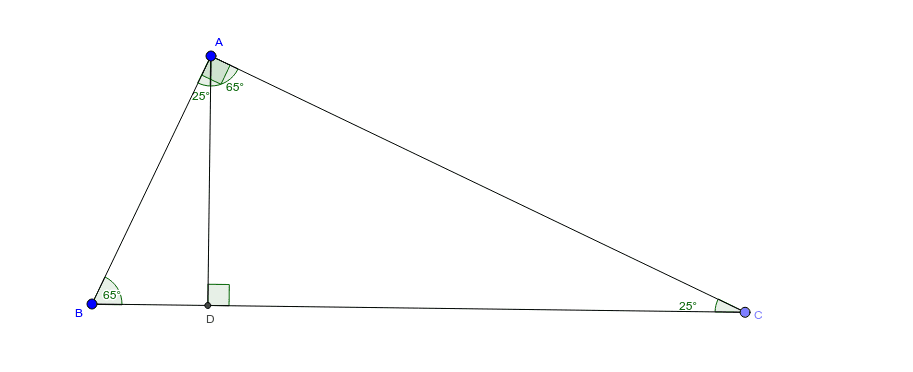
This example demonstrates the exploration of geometric mean through right triangles. The core mathematical concepts involved include geometric mean, right triangles, and segments. Key points in construction: Uses GeoGebra commands Segment, OrthogonalLine, Point, Angle, Intersect; objects include A, B, a, b, C, c, d, α, D, β, e, f, γ, δ, ε, ζ. Suitable for high school mathematics courses to help students understand the concept of geometric mean and its application in right triangles.
GeoGebra Commands & Parameters
Segment(A, B) → aOrthogonalLine(A, a) → bPoint(b) → CSegment(B, C) → cOrthogonalLine(A, c) → dAngle(B, A, C) → αIntersect(d, c) → DAngle(C, D, A) → βSegment(A, C) → eSegment(A, D) → fAngle(A, C, D) → γAngle(D, A, C) → δAngle(D, B, A) → εAngle(B, A, D) → ζ
AI Drawing Prompt Reference
Draw a horizontal segment as the base. From its left endpoint, construct a perpendicular line upward and pick a point on it. Connect this point to the right endpoint of the base to form a hypotenuse. Then from the left endpoint of the base, draw a perpendicular to the hypotenuse, intersecting it at a point. This creates two right triangles. Mark all interior angles of both triangles. Finally, connect the left endpoint of the base to the foot of the perpendicular and to the intersection point on the hypotenuse, forming two auxiliary segments. The figure shows a right triangle with an altitude to the hypotenuse, illustrating similar triangles and the geometric mean relationship.
The prompt above was compiled from the original drawing commands and is for reference only.