
Geometric Mean Exploration with Right Triangles by appelj
Loading the math board and drawing, please wait…
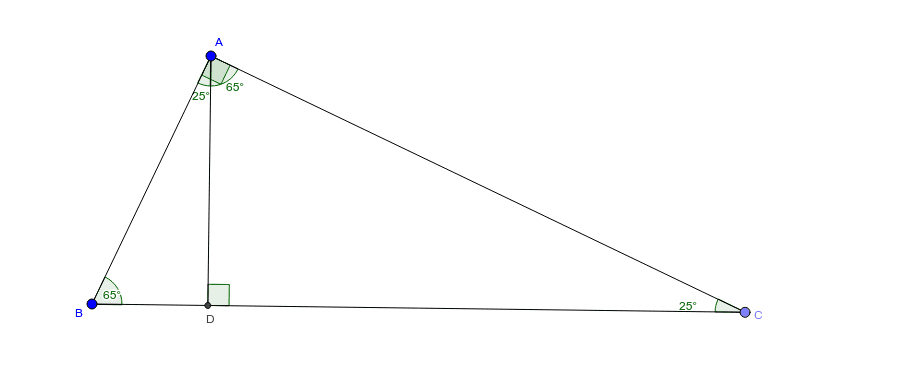
This GeoGebra exploration demonstrates the geometric mean relationship in a right triangle: the altitude to the hypotenuse is the geometric mean of the two segments it creates on the hypotenuse. It visually shows that the altitude squared equals the product of the two projection lengths. Core concepts include geometric mean, similar right triangles, and the mean proportional theorem. The construction uses GeoGebra commands such as Segment, OrthogonalLine, Point, Angle, and Intersect to build the right triangle, its altitude, and label angles (α, β, γ, δ, ε, ζ) and segments (a, b, c, d, e, f). Suitable for middle school (advanced) or high school students, this interactive tool helps learners grasp the geometric interpretation of the geometric mean and explore proportional relationships in right triangles.
GeoGebra Commands & Parameters
Segment(A, B) → aOrthogonalLine(A, a) → bPoint(b) → CSegment(B, C) → cOrthogonalLine(A, c) → dAngle(B, A, C) → αIntersect(d, c) → DAngle(C, D, A) → βSegment(A, C) → eSegment(A, D) → fAngle(A, C, D) → γAngle(D, A, C) → δAngle(D, B, A) → εAngle(B, A, D) → ζ
AI Drawing Prompt Reference
Draw a right triangle with an altitude from the right angle to the hypotenuse, creating two segments on the hypotenuse. Show that the altitude is the geometric mean of these segments, meaning the square of the altitude equals the product of the two segments. Label all angles and segments, emphasizing the concepts of similar right triangles and the mean proportional theorem.
The prompt above was compiled from the original drawing commands and is for reference only.