
Geometric Exploration of Quadratic Equations
Loading the math board and drawing, please wait…
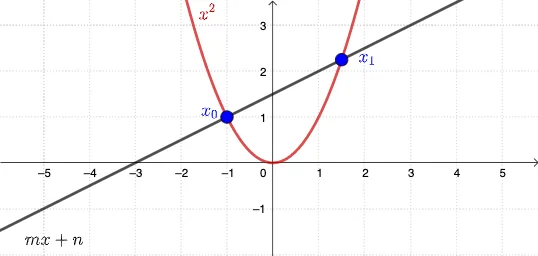
This GeoGebra example demonstrates the relationship between solutions of a quadratic equation and their corresponding geometric intersection points, letting learners visually examine how changing the setup affects where the intersections occur. The key math concepts are quadratic functions, equation roots interpreted as intersections, and geometric construction ideas for solving/locating solutions. Construction-wise, it centers on the GeoGebra command "Intersect" to compute intersection points of selected objects (m, n, f, g, plus auxiliary objects A, B). Those computed intersections are then used to represent the solutions of the quadratic relationship in a graph-based, geometry-driven way. Suitable for secondary school (advanced) through early university, and ideal for teaching and practice on connecting algebraic roots with graphical/geometry interpretations.
GeoGebra Commands & Parameters
Intersect(g, f, -10, 10) → A, B
AI Drawing Prompt Reference
Create a single coordinate-plane scene containing two given curves: one curve represents a quadratic function, and the other represents a related line or function. Visualize the solutions of the corresponding quadratic equation geometrically by finding and marking the intersection points of the two curves within a specified vertical range (from −10 to 10). First place both curves on the same axes, then locate where they intersect inside that interval, and finally highlight those intersection points as the graphical counterparts of the equation’s roots, emphasizing the link between algebraic solutions and geometric intersections.
The prompt above was compiled from the original drawing commands and is for reference only.