
Geometric Demonstration of Linearly Dependent Vectors
Loading the math board and drawing, please wait…
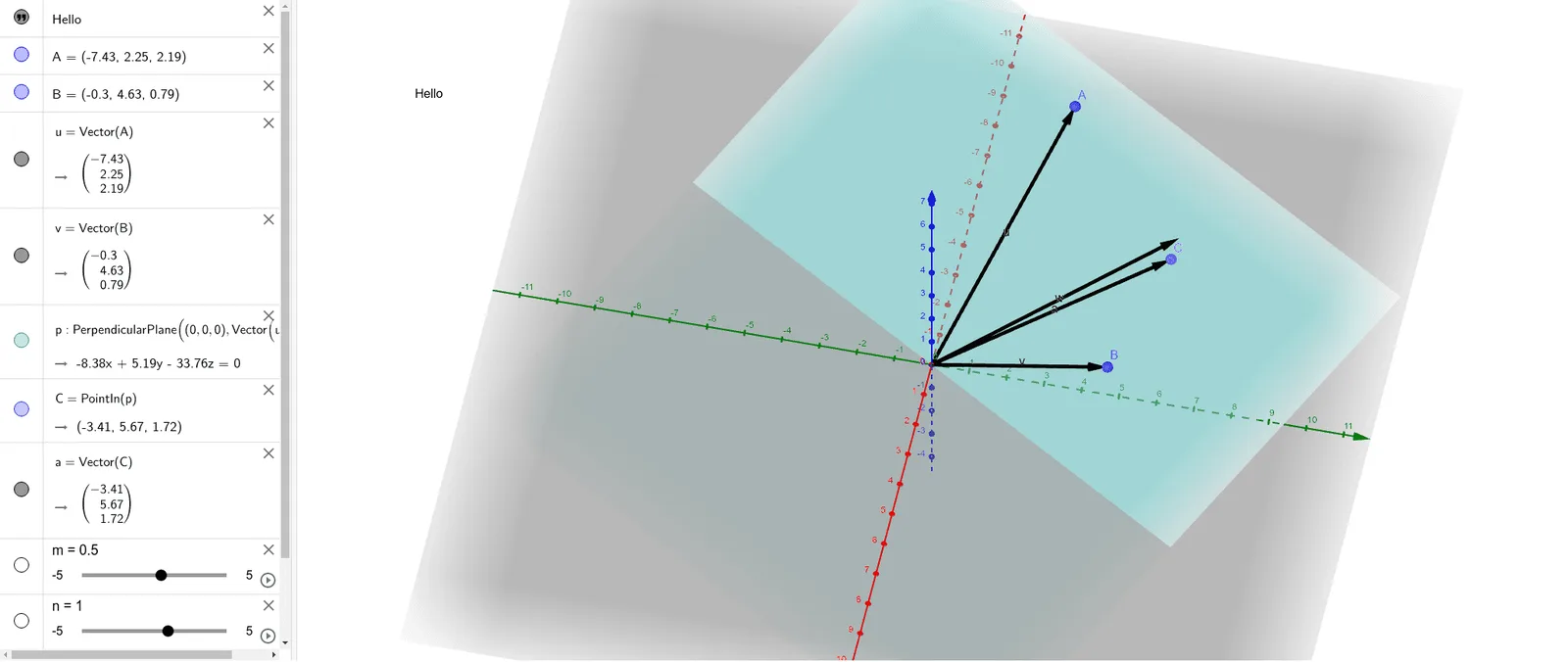
This example provides a visual demonstration of the concept of linear dependence among vectors in space. It focuses on the mathematical principles of linear dependence, collinearity, and linear combinations of vectors. The construction utilizes GeoGebra commands such as 'Vector' to define direction, 'OrthogonalPlane' to establish spatial references, and 'PointIn' to constrain points within specific planes. By manipulating objects like points A, B and vectors u, v, w, users can observe how vectors behave when they are linearly dependent. This tool is ideal for high school geometry or undergraduate linear algebra courses to bridge the gap between algebraic definitions and geometric intuition.
GeoGebra Commands & Parameters
Vector(A) → uVector(B) → vOrthogonalPlane((0, 0, 0), Vector[u ⊗ v]) → pPointIn(p) → CVector(C) → a
AI Drawing Prompt Reference
In 3D space, draw two vectors from the origin to two distinct points to show their directions. Then construct a plane passing through the origin that is perpendicular to the plane spanned by these two vectors, determined by their cross product. Pick an arbitrary point within this plane and draw a third vector from the origin to that point. The overall figure shows three vectors lying in the same plane, visually demonstrating linear dependence: the third vector lies in the plane defined by the first two, hence can be expressed as their linear combination.
The prompt above was compiled from the original drawing commands and is for reference only.