
Geometric Demonstration of Double Angle Formulas
Loading the math board and drawing, please wait…
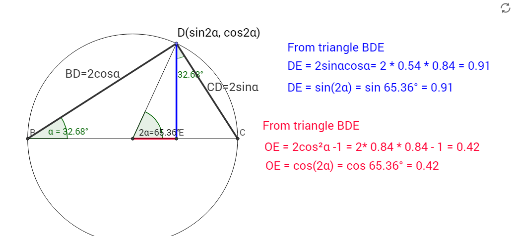
This example provides a dynamic geometric demonstration of double angle formulas, visually illustrating how the trigonometric values change when an angle is doubled. It involves core mathematical concepts such as trigonometric functions, angles, vectors, and geometric constructions. The construction utilizes GeoGebra commands and objects like Intersect, Circle, Point, Segment, OrthogonalLine, Angle, and Midpoint. Suitable for high school mathematics education to enhance understanding and application of double angle formulas.
GeoGebra Commands & Parameters
Intersect(xAxis, yAxis) → ACircle(A, 1) → cIntersect(c, xAxis) → B, CPoint(c) → DSegment(B, D) → aSegment(D, C) → bSegment(D, A) → dOrthogonalLine(D, xAxis) → eIntersect(e, xAxis) → ESegment(D, E) → sin2αAngle(E, B, D) → αAngle(C, A, D) → βAngle(C, A, D) → γMidpoint(a) → FMidpoint(b) → GSegment(A, E) → fAngle(E, D, C) → δSegment(B, C) → g
AI Drawing Prompt Reference
Draw a coordinate system with the origin as the center, and a unit circle. Let the circle intersect the x-axis at points B and C. Point D is on the circle. Draw segments BD, DC, and DA. Construct a perpendicular line to BD through D, intersecting the x-axis at E. Form angles α, β, and γ. Points F and G are the midpoints of BD and DC, respectively. Draw segment AE to form angle δ, and draw segment BC.
The prompt above was compiled from the original drawing commands and is for reference only.