
Geometric Constructions Base Example
Loading the math board and drawing, please wait…
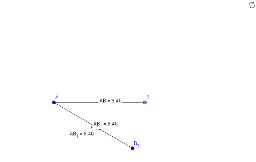
This example demonstrates basic geometric construction techniques. It involves core math concepts like segments, distances, midpoints, points, and text annotations. Key GeoGebra commands used include Segment, Distance, Midpoint, Point, and Text. Suitable for middle school students and above learning geometric constructions or for educational demonstrations.
GeoGebra Commands & Parameters
Segment(A, B_1) → aDistance(A, B_1) → distanceABDistance(A, B_1) → bMidpoint(A, B_1) →Point(Circle[A, 8.46]) → BSegment(A, B) → cDistance(A, B) → distanceACMidpoint(A, B) →
AI Drawing Prompt Reference
Draw a line segment, then draw a circle with radius half the length of the segment from one endpoint, connect the circle to the other endpoint to form a second line segment, label the lengths of both segments and their midpoints, and annotate the length value on the first segment.
The prompt above was compiled from the original drawing commands and is for reference only.