
Geometric Construction of Vector Subtraction
Loading the math board and drawing, please wait…
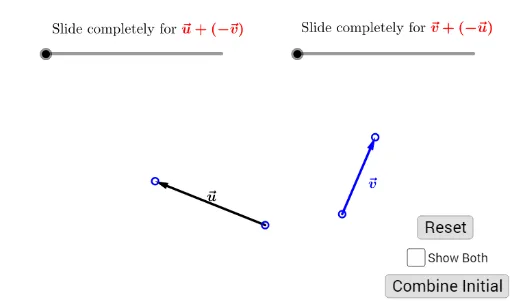
This example demonstrates how vector subtraction can be interpreted and constructed geometrically in the plane by converting the difference of two vectors into a corresponding segment/vector. It highlights the underlying phenomenon that a−b is obtained by aligning translated vectors and using directed segments so that the resulting vector matches the subtraction definition. The core concepts include vector arithmetic, the geometric meaning of subtraction, coordinate/coordinate geometry interpretation, and (when connected to lengths) the Pythagorean theorem for understanding relationships among components. Construction-wise, it uses GeoGebra commands such as Vector, Segment, and Point to create the initial vectors and endpoints; Translate to move vectors to the appropriate origin alignment; Rotate to obtain direction-equivalent vectors when needed; If to control conditional logic and switch between constructions; and Show/ShowBoth_1 to reveal or compare key objects. Typical created objects and parameters (e.g., A, B, u, v, u′, v′, TransUV, TransVU, t_1, t_2) form the pipeline from the given vectors to their computed difference. Suitable for high school through first-year university courses, especially for lessons on vectors, analytic geometry, and geometric construction methods.
GeoGebra Commands & Parameters
Vector(A, B) → u'Vector(C, D) → v'Segment(B, C) → bPoint(b, 1 - t_1) → EVector(C, E) → TransUVTranslate(C, TransUV) → C'Translate(D, TransUV) → D'Segment(A, D) → aPoint(a, t_2) → FVector(A, F) → TransVUTranslate(A, TransVU) → A'Translate(B, TransVU) → B'Vector(C', D') → vVector(F, B') → uRotate(D', 180°, E) → D''Segment(D'', E) → ePoint(e, 2 - t_1) → ISegment(D'', A) → fPoint(f, 3 - t_1) → JVector(A, J) → UVVector(E, I) → v''Rotate(B', 180°, D) → B''Segment(D, B'') → cPoint(c, t_2 - 1) → GVector(D, G) → u''Segment(C, B'') → gPoint(g, t_2 - 2) → KVector(C, K) → VUIf(Show ≟ true, t_1, 0) → ShowBoth_1If(Show ≟ true, t_2, 0) → ShowBoth_2
AI Drawing Prompt Reference
Draw two given vectors in the plane using directed segments from their starting to ending points. Construct the geometric meaning of the subtraction by aligning translated copies of one vector with the other’s base position: use the second vector’s direction to translate its endpoints to a common reference, then translate the first vector’s endpoints accordingly so the origins match. Next rotate one translated point by 180 degrees around an appropriate pivot reference and connect the rotated endpoint to the reference point to form the directed segment representing the resulting difference vector. Mark additional points on relevant segments at parameter-controlled positions to reveal key intermediate locations, and optionally show a paired comparison view alongside the main construction.
The prompt above was compiled from the original drawing commands and is for reference only.