
Geometric Construction of Parabola: Locus and Secant Method
Loading the math board and drawing, please wait…
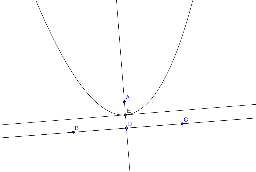
This example demonstrates how to construct a parabola using geometric construction methods. Core mathematical concepts include the locus definition of parabola, the relationship between focus and directrix, and the limiting relationship between secant and tangent lines. Construction key points extracted from GeoGebra commands: Using Line, Point, OrthogonalLine to draw the directrix and perpendicular from focus; using LineBisector to find the midpoint locus between focus and moving point; using Intersect to determine intersection points; finally generating parabola loc1 through Locus command, with objects including points A, B, C, D, E and lines a, b, c, d. Suitable for high school mathematics, analytic geometry courses, math competitions, and geometry construction enthusiasts.
GeoGebra Commands & Parameters
Line(B, C) → aPoint(a) → DOrthogonalLine(D, a) → bOrthogonalLine(D, b) → cLineBisector(A, D) → dIntersect(b, d) → ELocus(E, D) → loc1
AI Drawing Prompt Reference
Draw a geometric construction of a parabola: start with a straight line as the directrix and place a movable point on it. Through that point draw a perpendicular to the directrix, then draw a second perpendicular through the same point as an auxiliary line. Choose a fixed point as the focus, connect it to the moving point, and construct the perpendicular bisector of that segment. Mark the intersection of the first perpendicular and the perpendicular bisector, then let the moving point slide along the directrix and trace the path of this intersection to form the parabola. The figure should show the directrix, focus, moving point, perpendiculars, perpendicular bisector, intersection, and final locus.
The prompt above was compiled from the original drawing commands and is for reference only.