
Ellipse and Hyperbola Construction via Circle and Perpendicular Bisector
Loading the math board and drawing, please wait…
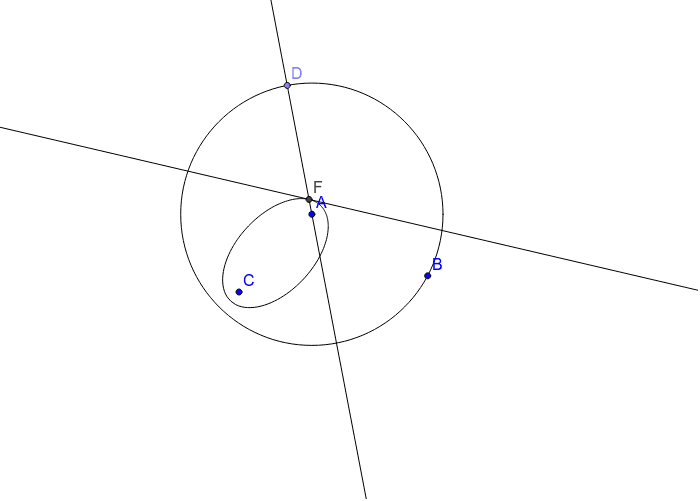
① This example demonstrates how to construct both an ellipse and a hyperbola simultaneously using a moving point on a circle and intersections with perpendicular bisectors, visually linking the two conic sections. ② Core mathematical concepts include the geometric definitions of an ellipse (sum of distances to two foci is constant) and a hyperbola (difference of distances is constant), properties of circles, perpendicular bisectors, and the locus of points. ③ Construction details: GeoGebra commands used are Circle, Point, LineBisector, Line, Intersect, and Locus; objects include points A, B, C, D, F, circle c, lines a and b, and locus loc1; a moving point C on the circle drives the intersection D with the perpendicular bisector to generate the locus. ④ Suitable for high school analytic geometry or conic sections lessons, as well as college-level geometric construction demonstrations, helping students grasp the unified construction and trajectory generation of ellipses and hyperbolas.
GeoGebra Commands & Parameters
Circle(A, B) → cPoint(c) → DLineBisector(C, D) → aLine(A, D) → bIntersect(b, a) → FLocus(F, D) → loc1
AI Drawing Prompt Reference
Draw a circle and place a moving point on it. Fix two foci outside the circle. Connect the moving point to one focus and construct the perpendicular bisector of that segment. Then connect the moving point to the other focus; this line intersects the bisector at a point. As the moving point travels along the circle, trace the intersection point to generate both an ellipse and a hyperbola, corresponding to constant sum and difference of distances to the two foci.
The prompt above was compiled from the original drawing commands and is for reference only.